HomeBedrockAddonsSchool Equipment Addon
School Equipment Addon
AddonsBedrock

School Equipment Addon

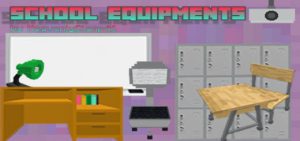
You may get typical things used in schools by purchasing the School Equipment Addon. Enjoy using an animated laptop, printer, locker, projector, and other…

⬇ DownloadOpen in MCModsHubGet it on Google Play →

You may get typical things used in schools by purchasing the School Equipment Addon. Enjoy using an animated laptop, printer, locker, projector, and other devices to play and learn with Minecraft.

Cre: Heavenly Craft PE (Youtube, Twitter)

School Equipment Addon

While on home quarantine, you can now use this addon to reminisce your schooldays. Our academic year at school is almost over! On a typical day, we would likely be attending school and immediately following it by hanging out with friends to add color to our life.

There are 19 items in this addon:

• Study Table           

    – has two textures
    – has inventory

• Study Table Set
    – has inventory

• Room Shelf
    – has inventory

• Locker
    – has inventory

• Table lamp

    – can be switched on/off

• Ceiling Mounted Projector

    – works fully and displays educational info
    – advisable to place on ceilings 4-5 blocks high

• Laptop

    – has an opening and closing animation

• Printer
    – fully animated

• The Cube (from the latest update, scroll down for more info)

________

I made a merge of these two:

• Teacher’s Table and Chair

• Student’s Table and Chair

to avoid lagging when too many entities are placed in the same place.

you can sit on all the chairs even with the ones merged with a table

Here is a video that shows you all the equipment (from the first release):

Some Minecraft Addons PE from Heavenly Craft PE you can check in Mcpeaddons.com:

I only have a vague idea for this before so thanks to a subscriber on my YT Channel for suggesting a detailed description of what items to put.

Although it now only represents a room, I am also using this addon to create a map of a school. Look at this:

Update

Version 1.0.7 – Click here to watch the youtube shorts School Equipment update!

The added animated printer:

The animated locker:

See the video on the text link for more reference on these two!

“The Cube” 

The cube represents the Earth like a globe would in the actual world. But because you’re in Minecraft, everything is square. (Details can be found in the changelog)

School Equipment addon

You can also subscribe to my youtube channel or follow me on Twitter.

Please note that you are not permitted to publish a direct link or a monetized link on any other websites, however you may use the MCPEDL link for this addon to send visitors to this page instead. 

This work is original. 

From the moment that she makes them, the author’s literary and artistic works are automatically protected.

Changelog

The Cube is added!
How to use the cube:

  • To spin it around: Right-click on your mouse or press the interactive button
  • To make it glow in the dark: Crouch then right-click on your mouse or press the interactive button again
  • You also have the option to stop it from spinning

Installation

How to download in linkvertise:

1. Click “Free Access with Ads” in the black tab at the center of the page.

2. Complete the steps. If you are asked to:

– Discover Articles. Just click on it. A number of articles will be shown–you do not have to click them. You can just click the “X” button and wait for a few seconds

3. Click “Continue” once you have finished the steps and you will be automatically redirected to the file.

Download School Equipment Addon (B) v1-0-9 (Linkvertise) or Download Link backup

Download School Equipment Addon(R) v1-0-9 (Linkvertise) or Link backup

Verified by MCModsHub

These come from our own check of the pack file, not from the source page.

Explore more