RFTools Control
Java mod listed for Minecraft 1.16–1.21. File opened and checked on 28 Sep 2026; downloads from the MC Java Mods app on Android.
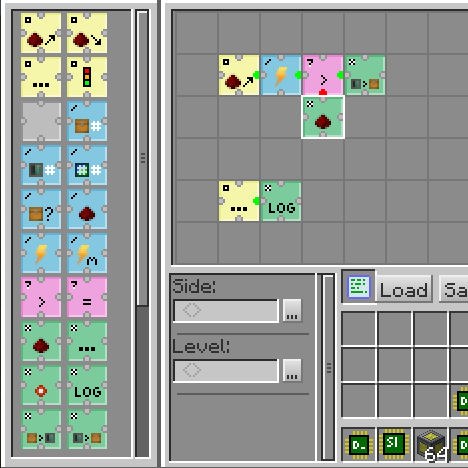
⬇ Download on CurseForgeRFTools Control is an addon mod for the RFTools mods which adds automation control using a visual grid based programming language. Using opcodes that you arrange in a grid you can move items around, control redstone, check energy (RF) and so on. You can access regular inventories but this mod also supports direct access to a storage scanner controlled system. In the future it will also provide a way to the storage scanner to autocraft items. This is not yet fully implemented however.
The two main blocks in this mod are the programmer which is used to create programs and the processor that executes those programs. Networking is also provided.

Note! Comments have been disabled because it is hard for me to check for this on too many places. If you want to submit a bug report then go to the 'Issues' tab or here: RFTools Control Issue Tracker. If you want to discuss RFTools in general you can do that here: RFTools Control on MC Forums
- Edition: Minecraft Java
- File type: .jar
- Minecraft versions listed: 1.21.1, 1.20.1, 1.19.3
- How to install: Install the matching mod loader (Forge, Fabric or NeoForge) for your Minecraft version. → Download the .jar. → Put it in the .minecraft/mods folder and launch that loader profile.
- Where to get it: Opens on CurseForge — not every file is mirrored on our own servers.
Install steps are the general flow for this file type — How to install Minecraft Java mods & modpacks walks through it step by step.
RFTools Control is a free Minecraft Java mod. Compatible with Minecraft 1.21.1, 1.20.1, 1.19.3, 1.19.4 and newer. Downloaded 76,292,478 times (via CurseForge). Download it and open it directly in the game.
![Minecraft RFTools Utility: Teleporter, Dialing Device und Spawner Tutorial german [2022]](https://i.ytimg.com/vi/Ko7D3nJ7h4Q/mqdefault.jpg)

![New Dimensions - Playing with Dimlets - RFTools Mod [Minecraft Sky Factory 2] [Ep29]](https://i.ytimg.com/vi/OoPLMkKnoS0/mqdefault.jpg)