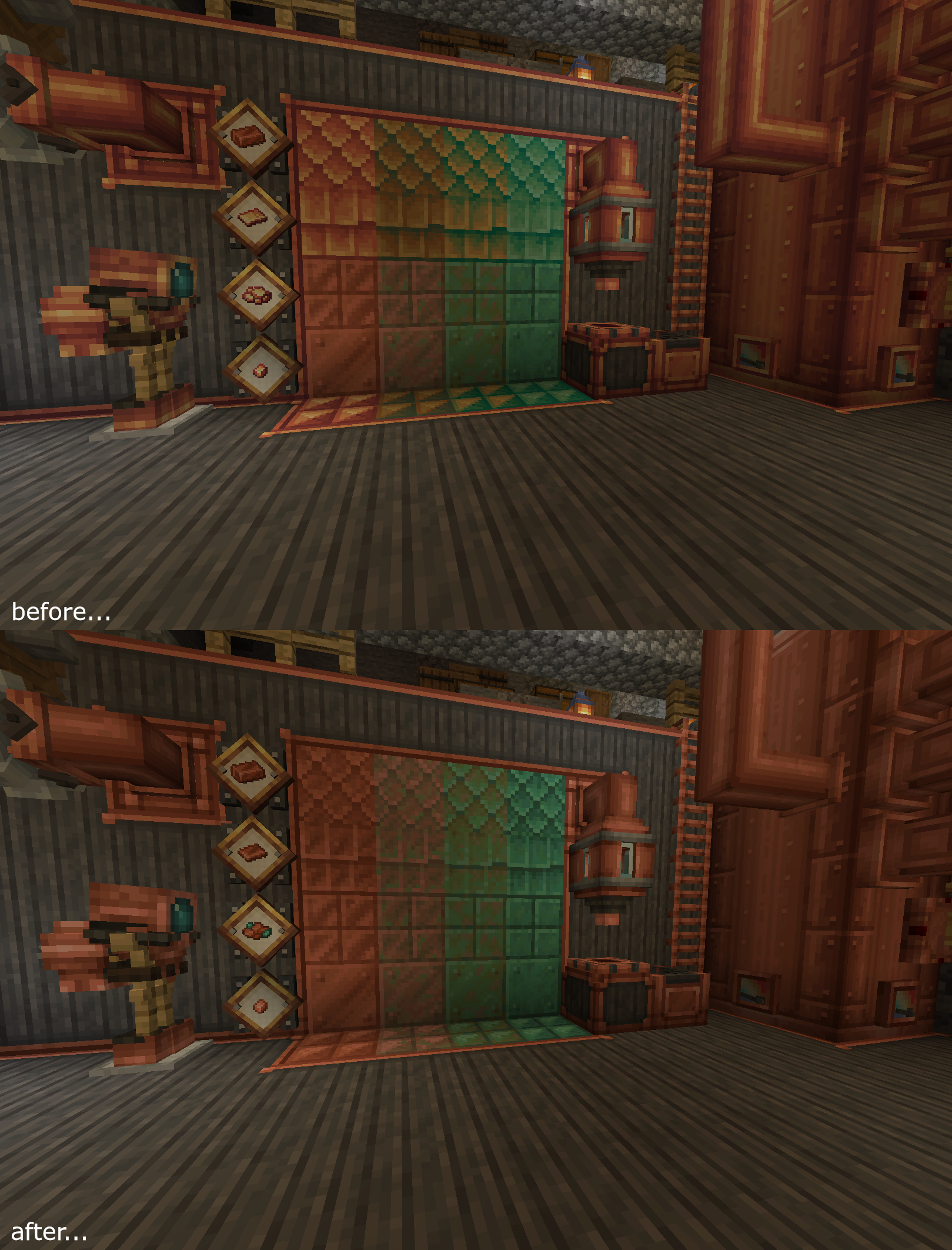

Updates the Create Mod's copper-related blocks and items so that they match with the vanilla color palette. This is NOT an official creation by the Create team.

How to Install
• Download the resource pack, it should be a .zip file.
• Locate the folder you saved the resource pack to and copy the .zip file.
• Open Minecraft and go to "Options" and then "Resource Packs."
• Click on "Choose Resource Pack Folder"
• Paste the .zip file into the folder and then head back into the game.
• The pack should be there, if not hit "Escape" and go back into "Resource Packs."
Obligatory discord advertisement: https://discord.gg/2phEd2mQhc
- Edition: Minecraft Java
- File type: .zip (resource pack)
- Minecraft versions listed: 1.18.2, 1.18, 1.19.2
- How to install: Download the .zip resource pack — do not unzip it. → Put it in .minecraft/resourcepacks. → Enable it in Options → Resource Packs.
- Where to get it: Opens on CurseForge — not every file is mirrored on our own servers.
Install steps are the general flow for this file type — How to install Minecraft Java resource packs walks through it step by step.
Create Reoxidized is a free Minecraft Java resourcepack. Compatible with Minecraft 1.18.2, 1.18, 1.19.2, 1.20.1 and newer. Downloaded 1,782,801 times (via CurseForge). Download it and open it directly in the game.