HomeJavaModsFog
Fog
ModsJava

Fog

by IMB11 · on Modrinth

Enhances fog rendering with dynamic, customizable effects—improving atmosphere and depth while preserving the vanilla experience and maintaining…

Which build do you need?

This mod ships a separate file for every mod loader and every version of the game. Pick both, then download — the wrong build installs fine and then does nothing in the game.

Mod loader

Minecraft version

⬇ Download for 1.21.9–1.21.10 · Fabric⬇ Download for 1.21.6–1.21.8 · Fabric⬇ Download for 1.21.5 · Fabric⬇ Download for 1.21.4 · Fabric⬇ Download for 1.21.2–1.21.3 · Fabric⬇ Download for 1.21–1.21.1 · Fabric⬇ Download for 1.20.5–1.20.6 · Fabric⬇ Download for 1.20.3–1.20.4 · Fabric⬇ Download for 1.20.2 · Fabric⬇ Download for 1.20–1.20.1 · Fabric⬇ Download for 1.19.3–1.19.4 · Fabric⬇ Download for 1.19.1–1.19.2 · Fabric⬇ Download for 1.21.9–1.21.10 · NeoForge⬇ Download for 1.21.6–1.21.7 · NeoForge⬇ Download for 1.21.5 · NeoForge⬇ Download for 1.21.4 · NeoForge⬇ Download for 1.21.2–1.21.3 · NeoForge⬇ Download for 1.21–1.21.1 · NeoForge⬇ Download for 1.20.5–1.20.6 · NeoForge⬇ Download for 1.20.3–1.20.4 · NeoForge⬇ Download for 1.20–1.20.1 · NeoForge⬇ Download for 1.20–1.20.1 · Forge
I don't know my version or loader
Open the Minecraft launcher and look at the profile you play on — it names both, like fabric-loader-1.21.4. The version also shows in the bottom-right corner of the game's main menu.
No loader in the profile name? Then it's plain Minecraft, and these mods won't run — you need Fabric or NeoForge installed first.
Fog — screenshot 1Fog — screenshot 2Fog — screenshot 3Fog — screenshot 4Fog — screenshot 5Fog — screenshot 6Fog — screenshot 7

Requires Fabric API IMB11 Discord server Steve's Underwater Paradise - Steveplays' Discord server

Requires Fabric API (for Fabric), M.R.U and Architectury API.

Fog

As it says on the tin - Fog is a mod that completely revamps how Minecraft handles fog, including its color, start, and end points. It creates a greater sense of depth and atmosphere in Minecraft by shifting the fog start forward, maintaining the same view distance while greatly improving the visuals of the game.

Features

It should be noted that the majority of these features can be fully customized via the configuration screen or resource packs - if you're using Fabric, you will need Mod Menu to access the configuration screen.

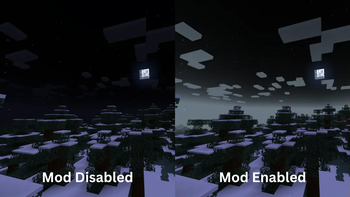
Cave Fog

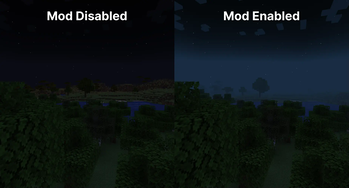
As you go deeper underground, the fog gets thicker. This adds to the spooky and mysterious feel of caves, making exploration more intense and immersive. It helps create a sense of depth, making the underground environment feel more alive and engaging.

Cave Fog comparison (left: Mod Disabled; right: Mod Enabled)

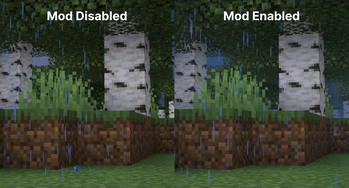
Weather Fog Modifiers

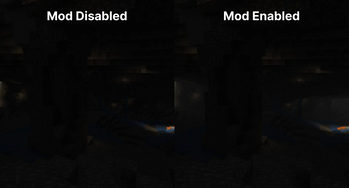
The fog adjusts with the weather, so during rain or snow, the fog will change accordingly. This adds to the overall atmosphere, making each weather condition feel distinct and visually appealing.

Weather Fog comparison (left: Mod Disabled; right: Mod Enabled)

Time-based Modifiers

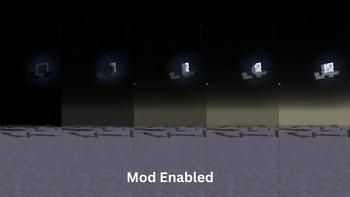
Fog becomes more colorful and vibrant during sunsets, sunrises. During night the fog colour will be dependent on the current moon cycle.

An image showing the different moon phases and how they affect fog colors. Example of sunset vibrancy (left: Mod Disabled; right: Mod Enabled)

Biome Fog Colors

Fog changes color based on the biome you're in, giving each area a unique look and feel. This helps create a coherent visual experience as you move through different biomes. It supports modded biomes and is easy to customize using resource packs, allowing for a highly personalized game experience. Example of biome colors. (Left: Mod disabled, Right: Mod enabled)

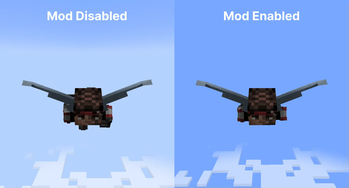
Sky Fixes

When flying with an elytra above the clouds, the fog gradually fades away, offering a clear view of the sky without any strange horizon lines.

Additionally, clouds maintain their natural look and are not affected by fog color, ensuring they always appear consistent and visually appealing.

Sky Fixes comparison (left: Mod Disabled; right: Mod Enabled)

Configuration

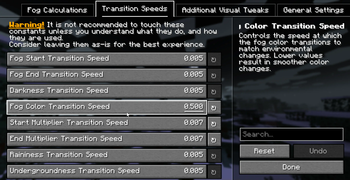
Fog is extremely customizable thanks to Yet Another Config Library, you should check the configuration screen accessible via Mod Menu on Fabric, or the Mods List on NeoForge for a full list of configuration options.

A configuration screen showing a list of various transition speeds you can modify.

Dependencies

Required

Compatibility info

Compatible mods

Incompatibilities

See the issue tracker for a list of incompatibilities.

Download

Fog is available for NeoForge and Fabric for 1.21-1.21.4 versions. You can download Fog from the following locations:

FAQ

For Developers and Server Admins

If you want to add support for your modded biomes, you can utilize Fog's custom JSON fog definition format to create unique fog effects. The mod is fully customizable via resource packs and a dedicated configuration file.

Furthermore, if you're developing a Fabric mod, you can utilize Fog's custom datagen providers to speed your development workflow up when adding compatability with the mod.

Server owners can adjust fog start/end points and biome colors to match their server's aesthetic.

For more information, check out Fog's documentation.

License

This project is licensed under All Rights Reserved, see LICENSE.

Attribution

Quick facts

Install steps are the general flow for this file type — How to install Minecraft Java mods & modpacks walks through it step by step.

Verified by MCModsHub

These come from our own check of the pack file, not from the source page.

Explore more