
Music Delay Remover (Infinite Music)
Java mod listed for Minecraft 1.21. Downloads from the MC Java Mods app on Android.
I don't know my version or loader

Infinite Music (fabric 1.20.x, 1.21.x)
Experience uninterrupted auditory bliss with the Infinite Music mod, removing the delay between music tracks, allowing for a seamless and immersive musical journey throughout your in-game adventures.
Features
- removes the delay between music tracks by default
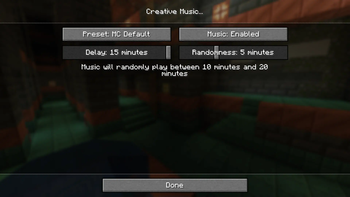
- configure the delay for different types of music
- disable/enable types of music
- the following music types can be configured:
- main menu
- gameplay (survival)
- creative
- underwater
- end
- pauses in-game music while a music disc music is playing
Configuration
Mod Menu is required to access the configuration; however, is optional for the mod to function. View the gallery for a preview of the configuration.
Compatibility
If you would like control of the music track playing, this mod is compatible with Music Notification from verison 0.4.6.
- Edition: Minecraft Java
- File type: .jar
- Minecraft versions listed: 1.21, 1.21.1, 1.21.2
- How to install: Install the matching mod loader (Forge, Fabric or NeoForge) for your Minecraft version. → Download the .jar. → Put it in the .minecraft/mods folder and launch that loader profile.
- Where to get it: Opens on Modrinth — not every file is mirrored on our own servers.
Install steps are the general flow for this file type — How to install Minecraft Java mods & modpacks walks through it step by step.
- Ships as infinite-music-0.4.6.jar — drop this file into the mods folder
- Download size: 45 KB
- Download link checked 7 Oct 2026 — working
These come from our own check of the pack file, not from the source page.