
Armor Trim Item Fix
Java mod listed for Minecraft 26.x. Downloads from the MC Java Mods app on Android.
⬇ Download on Modrinth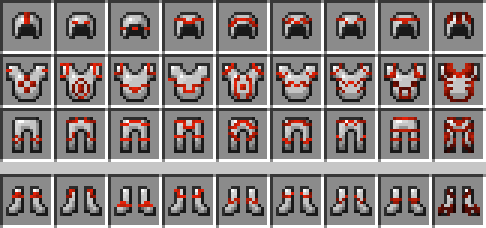





📘 Description
Trimmed armor items in Minecraft display one of four generic trim textures for every item, no matter what trim you put on an item the texture is always the same. This mod fixes that by adding more item trim textures that change depending on the trim applied
Fabric API required for Fabric version
Supports More Armor Trims
📜 Terms of Use
You may
✅ Use this mod as a reference to understand and or create something of your own, as long as it is not a copy or recreation
✅ Use this mod in modpacks with credit and one or more links to any of the project pages*
✅ Edit for personal use
✅ Use this mod for/in YouTube videos with credit and one or more links to any of the project pages*
✅ Create resource packs, data packs, and addon mods for this mod
You may not
❌ Reupload/publish this mod to any website without explicit permission from me and one or more links
to any of the project pages*
❌ Redistibute edited or unedited assets** from this mod without permission from me and credit
* Project pages include CurseForge, Modrinth, Planet Minecraft, GitHub
** Assets include logos, banners, textures, models etc


Want to play with your friends on a server? Get 15% off your first month with code einstein.
Click here or on the banner below to get started!

- Edition: Minecraft Java
- File type: .jar
- Minecraft version listed: 26.2
- How to install: Install the matching mod loader (Forge, Fabric or NeoForge) for your Minecraft version. → Download the .jar. → Put it in the .minecraft/mods folder and launch that loader profile.
- Where to get it: Opens on Modrinth — not every file is mirrored on our own servers.
Install steps are the general flow for this file type — How to install Minecraft Java mods & modpacks walks through it step by step.
- Ships as ArmorTrimItemFix-neoforge-26.2-2.1.6.jar — drop this file into the mods folder
- Download size: 307 KB
- Download link checked 7 Oct 2026 — working
These come from our own check of the pack file, not from the source page.