
ModsJava
Simple HUD Enhanced
A Fabric Minecraft mod that enhances the game's HUD by introducing customizable elements and features to display information.
⬇ Download on Modrinth
Supports Versions 26.2 to 1.17
Make Any HUD You Want

Monitor Effects Duration a Glance

Mod Menu

Features:
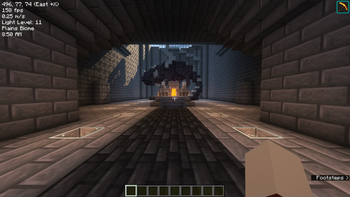
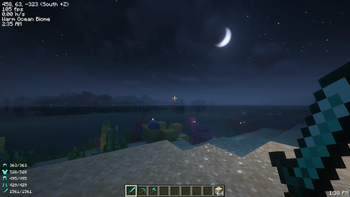
- Coordinates (With Directions): Always know where you are heading.
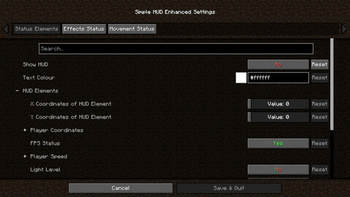
- Customizable Elements: Modify the presentation of various in-game information.
- Customizable Position: Move the HUD anywhere on your screen.
- Customizable HUD Size: Adjust the size to suit your visual preferences.
- FPS: Keep an eye on your game's performance.
- TPS Client-Side Compatibility: Experience smooth performance with TPS tracking.
- Velocity (Vertical & Horizontal): Track your movement speed.
- Light Level: Stay aware of your surroundings.
- Server Ping: Monitor your connection to the server.
- Current Biome: Know the biome you're exploring.
- In-Game Time (12 & 24 Hour Format): Never lose track of time.
- In-Game Day Counter: Keep track of the number of days passed in the game.
- System Time (12 & 24 Hour Format): Real-world time at a glance.
- Nether Conversation: Seamless transition monitoring.
- Chunk Coordinates: Track your position in the world with chunk-level precision.
- Sub-Chunk Coordinates: Dive deeper with detailed sub-chunk positioning.
- Player Status Effects Ring Timer: Time your buffs and debuffs.
- Player Movement Status: Sprinting, swimming, flying, sneaking – keep track of it all.
- Player Armour and Items Durabilities & Count on the HUD: Manage your equipment efficiently.
- Trinkets API Support: Integrate seamlessly with Trinkets to enhance your gameplay.
- Paper Doll: Your dynamic avatar, showcasing in-game moves, gear, and status at a glance.
Download the mod now and take control of your HUD like never before!
Join The Discord!
Quick facts
- Edition: Minecraft Java
- File type: .jar
- Minecraft version listed: 26.2
- How to install: Install the matching mod loader (Forge, Fabric or NeoForge) for your Minecraft version. → Download the .jar. → Put it in the .minecraft/mods folder and launch that loader profile.
- Where to get it: Opens on Modrinth — not every file is mirrored on our own servers.
Install steps are the general flow for this file type — How to install Minecraft Java mods & modpacks walks through it step by step.
Verified by MCModsHub
- Ships as simple-hud-enhanced+26.2-4.7.5-beta14.jar — drop this file into the mods folder
- Download size: 1.1 MB
- Download link checked 26 Aug 2026 — working
These come from our own check of the pack file, not from the source page.