
Mod Loading Screen
Java mod listed for Minecraft 1.0–26.x. Downloads from the MC Java Mods app on Android.
⬇ Download on Modrinth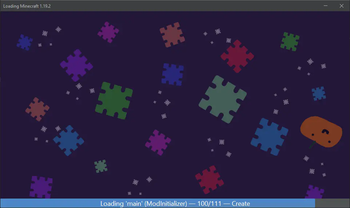
Mod Loading Screen
An advanced loading screen with the loading progress of mods. It works on all Minecraft versions, as it doesn't even require Minecraft. Its only requirement is Fabric Loader 0.12.0 or later or Quilt Loader (specific versions of Quilt support are unknown). Do note that if you run this mod on a game other than Minecraft, the loading screen may not close itself.
Agent
Mod Loading Screen provides a Java agent, which allows opening the loading screen before even the mod loader itself loads. This feature is primarily targeted at modpack developers who want to make a seamless loading experience. The agent can be used by passing -javaagent:mod-loading-screen-1.0.4.jar as a JVM argument. If the agent is used, the loading screen should not be installed as a mod.
API
To depend on the API, use the Modrinth Maven. The API should be JiJed, and doing so will not include Mod Loading Screen inside your mod (it will only include the API, which is only a few kilobytes). The API is designed to have both forwards and backwards binary compatibility with future Mod Loading Screen versions. An API is provided for checking which API calls will return stubs and which ones are real.
repositories {
    exclusiveContent {
        forRepository {
            maven {
                name = "Modrinth"
                url = "https://api.modrinth.com/maven"
            }
        }
        filter {
            includeGroup("maven.modrinth")
        }
    }
}

dependencies {
    // implementation, not modImplementation!
    include(implementation("maven.modrinth:mod-loading-screen:1.0.4:api"))
}
The API has two top-level classes: LoadingScreenApi and AvailableFeatures. Full javadocs are available for both classes.
- Edition: Minecraft Java
- File type: .jar
- Minecraft versions listed: rd-132211, rd-132328, rd-20090515
- How to install: Install the matching mod loader (Forge, Fabric or NeoForge) for your Minecraft version. → Download the .jar. → Put it in the .minecraft/mods folder and launch that loader profile.
- Where to get it: Opens on Modrinth — not every file is mirrored on our own servers.
Install steps are the general flow for this file type — How to install Minecraft Java mods & modpacks walks through it step by step.
- Ships as mod-loading-screen-1.0.5.jar — drop this file into the mods folder
- Download size: 1.2 MB
- Download link checked 7 Oct 2026 — working
These come from our own check of the pack file, not from the source page.