
Health Indicator
Java mod listed for Minecraft 1.21–26.x. File opened and checked on 19 Oct 2026; downloads from the MC Java Mods app on Android.
I don't know my version or loader
DESCRIPTION
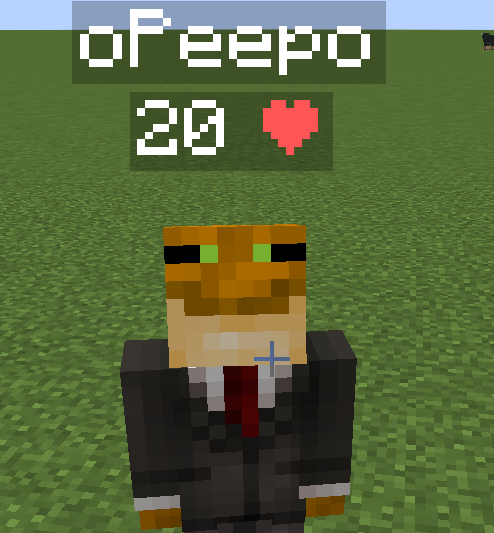
This data pack displays every player's health above their head. This can be useful on pvp servers, or any multiplayer server where you need to see other players' health for whatever reason.
INSTALLATION GUIDE
go to your saves folder located here on Windows:
C:\Users(your name)\AppData\Roaming\.minecraft\saves
put the zipped file in the data packs folder, and either restart your world or execute /reload
UNINSTALLATION GUIDE
run this command /function hp:uninstall, and then delete the data pack. Make sure to not reload (/reload or by restarting your world) after running the uninstall command until the data pack is deleted!
OTHER THINGS TO NOTE
- Keep in mind the number shown are health points and not hearts, 1 heart = 2 health points.
- this data pack only displays PLAYER health, not MOB health.
- for feedback, bug reports, or other help, join the discord server from the links section of this page!
- Edition: Minecraft Java
- File type: .jar
- Minecraft versions listed: 1.21, 1.21.1, 1.21.2
- How to install: Install the matching mod loader (Forge, Fabric or NeoForge) for your Minecraft version. → Download the .jar. → Put it in the .minecraft/mods folder and launch that loader profile.
- Where to get it: Opens on Modrinth — not every file is mirrored on our own servers.
Install steps are the general flow for this file type — How to install Minecraft Java mods & modpacks walks through it step by step.
- Ships as health-indicator-4.jar — drop this file into the mods folder
- Download size: 4 KB
- Download link checked 7 Oct 2026 — working
These come from our own check of the pack file, not from the source page.