Inventorio
Java mod listed for Minecraft 1.21. Downloads from the MC Java Mods app on Android.
I don't know my version or loader

Inventorio - An inventory enhancement mod for Minecraft
Showcase Video:
About
This is my vision of the Inventory Update for Minecraft. Of features I believe are in line with Mojang's vision and could be potentially added to the game.
Available for both Fabric and NeoForge.
"I press E but nothing happens"
This mod needs to be installed both on the server and on the client. Installing it just on one side will cause bugs.
Dependencies
Fabric
NeoForge
Features
Global
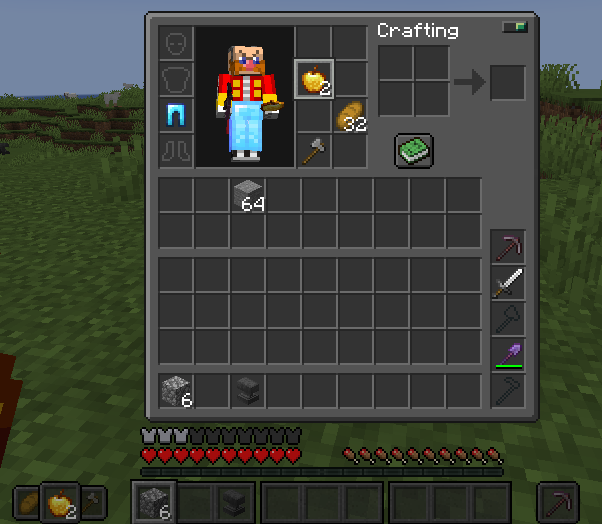
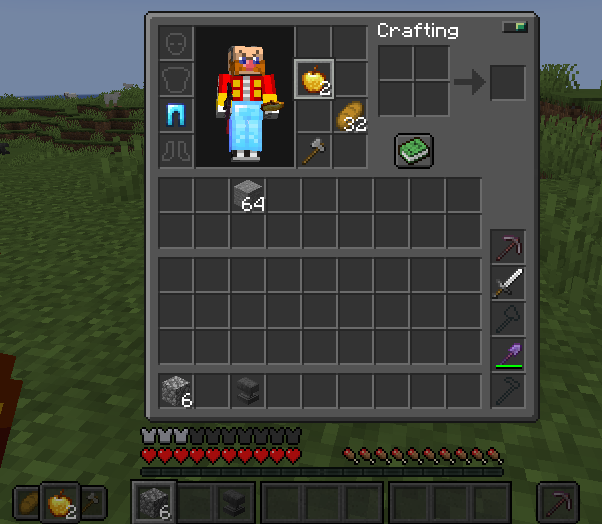
Toolbelt
Instead of taking space in the Hotbar, tools are now stored in their own place. When you mine a block, a correct tool gets passively applied from the said Toolbelt.
- Mending will mend tools in the Toolbelt before going into player's XP bar
- Axe will be used as a melee weapon in the sword slot is empty
- Hoe Toolbelt slot accepts shears. Sword Toolbelt slot accepts Trident.
- Toolbelt slots accept modded tools as long as they inherit from vanilla tool classes.
Utility Belt
An Offhand replacement with a dedicated hotbar of 4 slots that can be scrolled through independently, and which skips the empty slots. You can use the selected Utility independently, which allows you to akimbo two types of blocks or two types of usable items.
Deep Pockets Enchantment
Each level of this enchantment adds an additional row to your inventory, up to 3 at max level. In addition, the first level adds 4 extra slots to the Utility Belt (from 4 to 8)
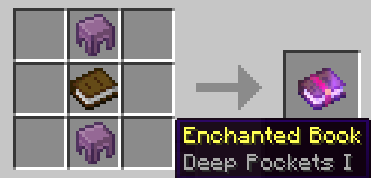
The Enchanted Book can be crafted from 2 shulker shells and a book, as well as traded from villagers or found in treasure chests.

Increased Ender Chest Capacity
The capacity of the Ender Chest has been doubled. This can be disabled in the server-wide config, but you need to distribute the said config to all players if you edit it.
Infinity Bow Requires No Arrow
This mod fixes a Vanilla bug when you need an arrow to use the Infinity Bow.
Totems of Undying activate from the Utility Belt
Instead of being permanently stuck in the offhand, it will go off from any of 4 (8 with Deep Pockets) Utility Belt slots.
Player Settings
Segmented Hotbar
Accessing slots after 5 with a keyboard might be cumbersome because the keys are just too far away. This feature makes the first keystroke select a section, and the second keystroke will select an item inside that section.
There's a "Visual Only" option that keeps the default selection schema.
Firework Rocket Boost Button
A dedicated button to fire a boost rocket directly from your inventory while flying. Can be co-bound to Jump.
Trident Loyalty Check
This option prevents you from throwing a Trident without Loyalty.
"Use Item" Applies To Offhand
The original idea was to bind each hand to its own dedicated button, but some people found it confusing, and this option restores the vanilla behavior of vanilla "Use Item", while "Use Utility" applies only to the Utility Belt / Offhand.
Skip Empty Utility Slots
By default, scrolling and displaying the Utility Belt skips the empty slots, but you can set this behavior to false. There's also a keybind (not bound by default) that allows to scroll to the first empty Utility Belt slot.
Rebind Scroll Wheel to the Utility Belt
You can rebind the Scroll Wheel to scroll through the Utility Belt, while using the number keys to chose from the Hotbar slots.
Dark Inventorio Player UI
Compatibility with dark theme mods and resource packs.
Swapped Hands
This option allows to assign the vanilla Hotbar to your Offhand, and the Utility Belt to your Main Hand.

Global Settings
To improve mod compatibiltiy, some features can be disabled on a game-wide level for all players.
Global settings can be accessed with a keybind (only in a single player world) or directly at %root_folder%/config/inventorio_shared.json.
Joining a server (either dedicated or hosted from another client) with mismatching global settings will prompt a request to sync your settings and restart the game, but sharing the config beforehand is recommended.
For the list of settings please visit the GitHub page
Feedback, Use in Modpacks and Mod Compatibilty
Feel free to use this mod in a modpack.
If you encounter bugs or compatibilty issues with other mods, please report them on the Issue Tracker.
If you want to request a feature or modification, please use the Issue Tracker or make a Pull Request.
For technical information, such as InventorioAPI, custom ToolBelt slots and Mod Compatibility, please visit the GitHub page.
- Edition: Minecraft Java
- File type: .jar
- Minecraft versions listed: 1.21, 1.21.1
- How to install: Install the matching mod loader (Forge, Fabric or NeoForge) for your Minecraft version. → Download the .jar. → Put it in the .minecraft/mods folder and launch that loader profile.
- Where to get it: Opens on Modrinth — not every file is mirrored on our own servers.
Install steps are the general flow for this file type — How to install Minecraft Java mods & modpacks walks through it step by step.
- Ships as inventorio-mc1.21.1-fabric-v1.11.0.jar — drop this file into the mods folder
- Download size: 336 KB
- Download link checked 7 Oct 2026 — working
These come from our own check of the pack file, not from the source page.