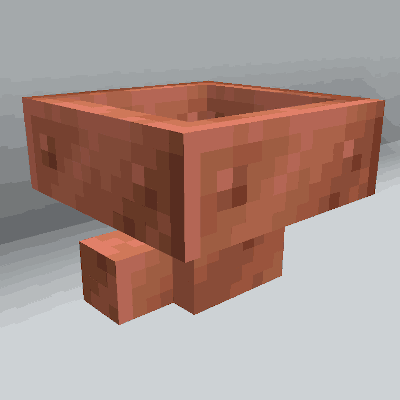
Copper Hopper
Copper Hopper adds a new kind of Hopper that filters the items to get pulled and pushed. They save you the tedium of building gigantic item sorters while retaining a Vanilla Minecraft spirit.
Features
- Filter up to 5 items per Copper Hopper
- Filter both stackable and unstackable items
- Uses the Fabric modloader
- Make Copper Hopper Minecarts!
- Made of copper!
Recipes


Setting Filters

Make sorting systems like this!


How do use it?
Just put an item in one of the regular hopper slots to "set" a filter. That item will never be pulled or pushed out of the hopper. And the hopper will now only accept items of that type.
You can do this up to five times (once per slot).
How does it work exactly?
A Copper Hopper works just like a regular hopper except:
- They never accept an item of a type that is not already held in the hopper.
- They always keep the last item of a type that is held in the hopper.
- If one Copper Hopper is below another, it will always pull matching items before the upper hopper pushes them.
- This allows you to create hopper columns that filter items into vertically-stacked chests.
Does it work with unstackable items?
Yes! But if you filter on unstackable items, be sure to keep one of the hopper slots empty or the filtering won't work correctly.
Notes
- The item texture for Copper Hopper was contributed by Pablo Henrique. (Thanks!)
- Copper Hopper was inspired by Mr. Crayfish's excellent Golden Hopper forge mod.
- I will not be doing a Forge port of Copper Hopper. (sorry)
Legal
This mod is published under the MIT License.
You're free to include this mod in your modpack provided you attribute it to pcal.net.
Questions?
If you have questions about this mod, please join the Discord server:
- Edition: Minecraft Java
- File type: .jar
- Minecraft version listed: 26.2
- How to install: Install the matching mod loader (Forge, Fabric or NeoForge) for your Minecraft version. → Download the .jar. → Put it in the .minecraft/mods folder and launch that loader profile.
- Where to get it: Opens on Modrinth — not every file is mirrored on our own servers.
Install steps are the general flow for this file type — How to install Minecraft Java mods & modpacks walks through it step by step.
- Ships as copperhopper-neoforge-0.24.0+26.2.jar — drop this file into the mods folder
- Download size: 56 KB
- Download link checked 26 Aug 2026 — working
These come from our own check of the pack file, not from the source page.