
Fog Looks Modern Now
Java mod listed for Minecraft 1.20. Downloads from the MC Java Mods app on Android.
Helps fog look better by moving the fog start closer. Additionally, adds cave fog and biome specific fog density. Forge 1.20+ port of Fog Looks Good Now
I don't know my version or loader
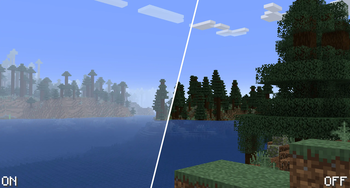
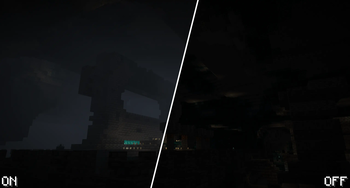
Fog Looks Modern Now
This is a 1.20+ port of Fog Looks Good Now, the original Forge version can be found here. Modern Fabric port is also available
Fog Looks Good Now creates a greater sense of depth and atmosphere in Minecraft by shifting the fog start forward, maintaining the same view distance while greatly improving the visuals of the game.
In addition to this, the mod adds:
- Configurable fog start and fog end.
- Configurable cave fog start.
- Configurable cave fog color.
- Configurable weather-related fog (rain, thunder etc.) - To be done
Configuration
You can access the configuration either directly through the TOML file or through Config screen if Forge Config Screens is installed
Screenshots


- Edition: Minecraft Java
- File type: .jar
- Minecraft versions listed: 1.20.2, 1.20.3, 1.20.4
- How to install: Install the matching mod loader (Forge, Fabric or NeoForge) for your Minecraft version. → Download the .jar. → Put it in the .minecraft/mods folder and launch that loader profile.
- Where to get it: Opens on Modrinth — not every file is mirrored on our own servers.
Install steps are the general flow for this file type — How to install Minecraft Java mods & modpacks walks through it step by step.
- Ships as foglooksmodernnow-2.0.1+1.20.2.jar — drop this file into the mods folder
- Download size: 1.3 MB
- Download link checked 7 Oct 2026 — working
These come from our own check of the pack file, not from the source page.