
MTR Craft
Java modpack listed for Minecraft 1.19. File opened and checked on 1 Oct 2026; downloads from the MC Java Mods app on Android.
⬇ Download on Modrinth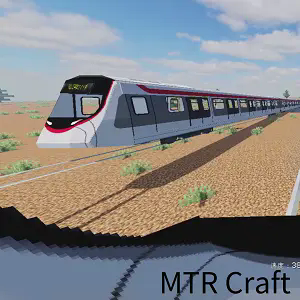
IMPORTANT!!!
This ModPack contains CurseForge and Modrinth mods.
Therefore, it is not compatible with GDlauncher, CurseForgeApp, etc.
If you really want to play with these launchers, please use MTR Craft Lite.
Cautions when playing with the Lite version
Lite version does not include some mods. (NTE, JCM, etc.).
Also, updates are not frequent.
If you still want to use the Lite version, please use the Lite version.
##Please join us on Discord!
Overview
This ModPack is designed to make playing Minecraft Transit railway fun and easy. It has most of the mods you need.
Here are some of them in detail.
Main Mod
Minecraft Transit railway
This is the base of this modpack.
Without it, it would not be possible.
Adds main automated trains, boats, ropeways, and planes.
The Tube (The London Underground)
Add-on for Minecraft Transit railway.
Adds items, blocks, etc. like those found in the world's oldest railroad station, the London Underground.
Joban Client Mod
Add items and blocks like those found in Hong Kong MTR stations.
Station Decorations
Adds many useful items to the station.
Nemo's Transit Expansion
This mod makes the rails look realistic.
Lightweight Mods.
Optimize FPS with
Sodium(Fabric)
Rubidium(Forge)
The load of integrated servers and servers can be reduced with
Lichium(Forge)
Radium Reforget(Forge1.18~)
Performer(Forge1.16.5)
Opifine's shaders can be used by
Iris sharpers(Fabric)
Oculus(Forge)
The light engine has been optimized by
Photsponer(Fabric1.16.5)
Radon(Forge1.16.5)
Starlight(1.17.1~)
Useful Mods
WorldEdit(All) and worldEditCUI(Fabric)
JEI (almost all versions)
REI (Fabric 1.16.5 only)
Jonurwary maps(almost all versions)
Xaero's Minimap(Fabric1.16.5,Fabric1.17.1 only)
- Edition: Minecraft Java
- File type: .jar
- Minecraft version listed: 1.19.4
- How to install: Install the matching mod loader (Forge, Fabric or NeoForge) for your Minecraft version. → Download the .jar. → Put it in the .minecraft/mods folder and launch that loader profile.
- Where to get it: Opens on Modrinth — not every file is mirrored on our own servers.
Install steps are the general flow for this file type — How to install Minecraft Java mods & modpacks walks through it step by step.
- Downloads as MTR Craft 1.19.4-Fabric 3.0.0.mrpack
- Download size: 8.8 MB
- Download link checked 7 Oct 2026 — working
These come from our own check of the pack file, not from the source page.