
Cull Clouds
Java mod listed for Minecraft 1.17–1.18. Downloads from the MC Java Mods app on Android.
I don't know my version or loader
Cull Clouds
Fabric mod that adds a small optimization improves clouds building way to not render parts which you cant see to increase fps
Works only with "Fancy" clouds
Why is this mod not updating?
Sodium has added the functionality of this mod in new versions, so, I think updates of this mod are no longer needed
And also, the mod gives too small increase in fps to develop it further, I don't know why people would need it, because as it says a bit above of the fps comparison picture, the mod usually only gives +1 fps if you play in normal scenarios
Compatibility
This mod has compatibility issues, I tested it with two mods:
Extended Clouds - does not run with Cull Clouds
SuperFancyClouds - runs, but Cull Clouds does nothing
The list of incompatibilities may grow, because in order to improve the vanilla clouds, Cull Clouds is essentially rewriting it
Performance
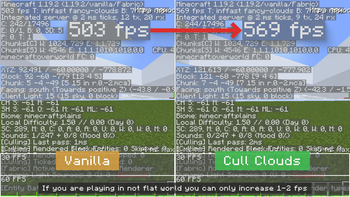
Here's a comparison of fps between Vanilla and Cull Clouds
If you're not playing on a flat world, the increase may be very small, something like a 1-2 fps difference
- Edition: Minecraft Java
- File type: .jar
- Minecraft versions listed: 1.17, 1.17.1, 1.18
- How to install: Install the matching mod loader (Forge, Fabric or NeoForge) for your Minecraft version. → Download the .jar. → Put it in the .minecraft/mods folder and launch that loader profile.
- Where to get it: Opens on Modrinth — not every file is mirrored on our own servers.
Install steps are the general flow for this file type — How to install Minecraft Java mods & modpacks walks through it step by step.
- Ships as cullclouds-0.1.1.jar — drop this file into the mods folder
- Download size: 17 KB
- Download link checked 7 Oct 2026 — working
These come from our own check of the pack file, not from the source page.