![AllTheMegas [Cobblemon]](https://cdn.modrinth.com/data/22J5gz5b/e3807cb74c39fa6f20f1d299bffe2440ff5e5639_96.webp)
AllTheMegas [Cobblemon]
AllTheMegas - Soul Megas & ATM Compatibility Pack This is Soul Megas but compatible with AllTheMons, don't use this with Soul Megas or Mega Showdown! It…
⬇ Download on Modrinth![AllTheMegas [Cobblemon] — screenshot 1](https://cdn.modrinth.com/data/22J5gz5b/images/3402d2047880d7e196602d2dbed1efe67cdf090e.png)
![AllTheMegas [Cobblemon] — screenshot 2](https://cdn.modrinth.com/data/22J5gz5b/images/a50123af3d5c046ad5718e7c5929de21ee36417b.png)
![AllTheMegas [Cobblemon] — screenshot 3](https://cdn.modrinth.com/data/22J5gz5b/images/64a259056b5b08465cce976ad4c848572c757a25_350.webp)
![AllTheMegas [Cobblemon] — screenshot 4](https://cdn.modrinth.com/data/22J5gz5b/images/46b95ddaaa8bc85fb65b07f228e50fe39d0b655e.png)
AllTheMegas - Soul Megas & ATM Compatibility Pack
This is Soul Megas but compatible with AllTheMons, don't use this with Soul Megas or Mega Showdown! It features permanent megas, with models from Soul Megas!
For 1.6 there were also two versions with game accurate in-battle megas (can still be found in the Legacy section below) but these have been depreciated. If you're looking for a better and more uptodate alternative, join the MegaShowdown discord!
Dependencies (You need these):
- Cobblemon 1.6.1
- AllTheMons R2.2+
How to install:
- Make sure you correctly installed all dependencies
- Make sure you've downloaded the correct/latest version of this pack
- Add this pack to your resourcepacks
(\resourcepacks) - Add this pack to your worlds datapack
(\saves\[YOURWORLDNAME]\datapacks) - Enable the resourcepack ingame
(ESC - Options - Resource Packs)
How Mega Evolutions work:
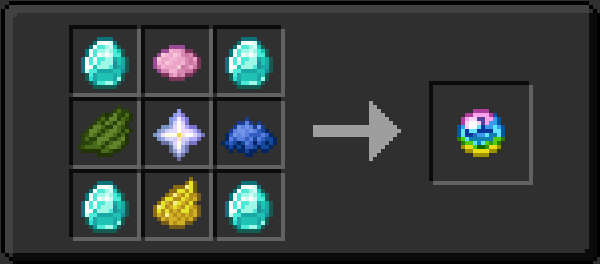
- You can Mega evolve anytime (outside of battle)
- Pokémon has to hold the Generic Megastone to mega evolve/deevolve (so switch it for an actual item while not using it)
- Pokémon has to be level 50+ (70+ for Pseudo & Legendaries)
- Pokémon has to have 180+ friendship with you
- NOTE that that item won't show up in JEI/REI!
Where do added Pokémon spawn?:
AllTheMons Pokémon
- Join their discord and type
/where <POKÉMONNAME>in any channel
AllTheMegas Pokémon
- Elektrike: Commonly in plains
- Manectric: Uncommonly in plains
- Snover: Commonly in snowy taigas
- Abomasnow: Unommonly in snowy taigas
- Audino: Unommonly everywhere (especially during the day!)
Something ain't working? - Some helpful sources:
Click me- AllTheMegas issues? - Join the Cobblemon discord and click here
- AllTheMons issues? - Join their discord
- Wanna configure Flourish? - Check their documentation here
- Wanna configure CobblemonMegas? Check their documentation
- Cobblemon issues? - Again, join their discord and ask around!
FAQ:
Click meFAQ and some important information:
Will this work with Cobblemon 1.6.1?
- Currently only the main version supports 1.6.1
- Legacy versions only support cobblemon 1.6.0
Does this work on Aternos?
- Only the Standalone Version is supported
- Legacy versions never will be, due to the newest versions of Flourish and CobblemonMegas not being on Modrinth.
- Also the Aternos people won't allow you to download fabric permissions API 0.3.1 for MC 1.21.1. So don't hate me, blame them.
What's the difference between Flourish and CobblemonMegas?
- Technically they do the same, though they have some little differences.
- Flourish has better animations, more dependencies and mega rayquaza is a lil' buggy
- CobblemonMegas has less animations, less dependencies and less issues with rayquaza
Why doesn't mega rayquaza work?
- The way its implemented into AllTheMons(ATM) conflicts with the way flourish works.
Why don't you fix that?
- This is basically an edited version of Soul Megas, which is meant to work with ATM. To fix mega rayquaza I'd have to edit the ATM files & thus create a whole new fork of it just for this, which I won't due to the licensing of ATM.
Can I fix this myself?
- Yes its fairly easy if you know how to edit a datapack. You'd have to delete all rayquaza & mega rayquaza related files from ATM (
assets-animations, models, posers, resolvers, textures;data-spawns, species/species_additions) and replace them with the rayquaza files from Soul Megas pack.
Legacy Versions:
Click meStandalone Version (Permanent Megas)
- Cobblemon 1.6 (Since I dropped support for newer versions)
- AllTheMons 2.1
- RoughlyEnoughItems/REI
Flourish Version (In-Battle Megas, better animations)
- Everything from the Standalone Version
- Fabric
- Polymer 0.9.18
- Fabric Permissions API 0.3.1 (Not 0.3.3 and yes it's for 1.21.1)
- Flourish 1.4.4 (Not 1.4.2 from Modrinth)
- Join the cobblemon discord, click here, then add to
\mods
- Join the cobblemon discord, click here, then add to
CobblemonMegas Version (In-Battle Megas, less dependencies, more commands)
- Everything from the Standalone Version
- Fabric
- Architectury API 13.0.8
- CobblemonMegas release 1.3.5-1.6.0-1.21.1
- Get it here, then add to
\mods
- Get it here, then add to
How to install:
- Make sure you correctly installed all dependencies
- Make sure you've downloaded the correct version of this pack
- Add this pack to your resourcepacks
(\resourcepacks) - Add this pack to your worlds datapack
(\saves\[YOURWORLDNAME]\datapacks) - Enable the resourcepack ingame
(ESC - Options - Resource Packs)
How find all the Mega recipes:
Flourish
- Mega Bracelet:
- In REI search for
Nether Starandright clickor pressu- It'll show the recipe for the Mega Bracelet
- In REI search for
- Mega Stones:
- Press
ron the Mega Bracelet- It'll show the recipe for all the Mega Stones
- Press
CobblemonMegas
- Mega Bracelet:
- In REI search for
Nether Starandright clickor pressu- It'll show the recipe for the Mega Bracelet
- In REI search for
- Mega Stones:
- In REI search for
Emeraldandright clickor pressu- It'll show you recipes for all the Mega Stones
- In REI search for
How to mega evolve:
- They function just like in the original pokemon games,
- Only in battles
- Only one mon per battle
- Mon has to be holding their respective Mega Stone
- You have to have the Mega Bracelet
- For Flourish it has to be in your off hand (can be changed inits config, info here)
- While choosing an attack in battle, you have a new button that (once clicked) will mega evolve your pokemon starting on the next turn
Known bugs:
- Flourish:
- Rayquaza not mega evolving (Flourish & ATM's implementation make this impossible, so if this ever integrates into ATM, easy needs to remove his rayquaza and megarayquaza, working on a easy to implement version/branch)
Credits!
Thanks to the amazing work of Soul and his mates, who made all the good looking mega models, which you can find here, he allowed me to upload and share this so go show some love!
- Edition: Minecraft Java
- File type: .jar
- Minecraft version listed: 1.21.1
- How to install: Install the matching mod loader (Forge, Fabric or NeoForge) for your Minecraft version. → Download the .jar. → Put it in the .minecraft/mods folder and launch that loader profile.
- Where to get it: Opens on Modrinth — not every file is mirrored on our own servers.
Install steps are the general flow for this file type — How to install Minecraft Java mods & modpacks walks through it step by step.
- Downloads as AllTheMegas v1.6(CMM).zip
- Download size: 1.1 MB
- Download link checked 27 Aug 2026 — working
These come from our own check of the pack file, not from the source page.