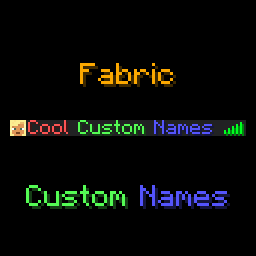
HomeJavaModsFabric Custom Names
Fabric Custom Names

Custom Names

Modrinth Version Modrinth Game Versions Modrinth Downloads Discord Badge Github Badge GitHub License Available for Fabric Available for NeoForge

This mod adds a /name, a /itemname and a /itemlore command to Minecraft, which players can use to set a prefix, suffix, or nickname, or give their items colourful names and lore. Mostly designed to be used in small, private servers, although through the use of name groups you can also limit which players can use which prefixes/suffixes/nicknames.

Optionally, the mod also has a feature to display custom names in-game, above a player's head. This also features options to customise the style (background colour and text opacity), as well as customising the lines of text shown.

Supports prefixes/suffixes set with LuckPerms as well!

Feel free to report any bugs, or suggest new features, at the issue tracker.

License

This mod is licensed under GNU LGPLv3.

Donating

If you like this mod, consider donating.

Discord

For support and/or any questions you may have, feel free to join my discord.

Version support

Minecraft Version Status
26.2.x ✅ Current
26.1.x ✔️ Available
1.21.11 ✔️ Available
1.21.9+10 ✔️ Available
1.21.6+7+8 ✔️ Available
1.21.5 ✔️ Available
1.21.4 ✔️ Available
1.21.2+3 ✔️ Available
1.21+1 ✔️ Available
1.20.5+6 ✔️ Available
1.20.4 ✔️ Available
1.20.1 ✔️ Available
1.19.4 ✔️ Available
1.19.2 ✔️ Available

I try to keep support up for the latest drop of Minecraft. Updates to newer Minecraft versions may be delayed from time to time, as I do not always have the time to immediately update my mods.

Unsupported versions are still available to download, but they won't receive new features or bugfixes.

NeoForge ports are available for Minecraft 26.1 onwards.

Usage

This mod is oriented at Fabric Minecraft servers, but works on the client as well. This mod requires the Fabric API.

The /name command can be used as follows:

When hovering over a player's name with advanced tooltips enabled, their real name will show up.

The /itemname command can be used to rename the item you're currently holding. Requires operator or the customname.itemname permission.

Similarly, the /itemlore can be used to set the lore of an item you're holding. Requires operator or the customname.itemlore permission. \n can be used to create new lines, \\ can be used to escape a backslash.

Similar to the /name commands, running these commands without arguments resets the item name/lore of the item you're holding.

Minecraft's formatting codes can be used to format your prefix, suffix, nickname, or your item names/lores. Instead of the § character, use & (to use & in an (item)name, type &&). Alongside Minecraft's default formatting codes, the &#<hex code> format can be used as well.

Useful tools to easily create formatted names are available here and here. Usage of formatting codes in names can be disabled in the config file.

Alongside the /name command, this mod also supports reading prefixes and suffixes from the LuckPerms mod.

Config file

The mod's configuration file is present in {root config directory}/eclipsescustomname.json. By default, the configuration file looks like this:

{
  "enable_formatting": true,
  "require_permissions": true,
  "blacklisted_names": [],
  "max_name_length": 16,
  "operators_bypass_restrictions": false,
  "display_above_player": {
    "enabled": false,
    "text_opacity": 255,
    "background_color": "#40000000",
    "lines": [
      "luckperms_prefix prefix nickname suffix luckperms_suffix"
    ]
  },
  "name_groups": {
    "prefix": {},
    "nickname": {},
    "suffix": {}
  }
}

For example, consider this name groups config:

"name_groups": {
  "prefix": {
    "vip": [
      "&f&l[&7VIP&f&l]",
      "&f&l[&9VIP&f&l]",
      "&f&l[&aVIP&f&l]",
      "&f&l[&bVIP&f&l]",
      "&f&l[&cVIP&f&l]"
    ],
    "legendary": [
      "&f&l[&7Legendary&f&l]",
      "&f&l[&9Legendary&f&l]",
      "&f&l[&aLegendary&f&l]",
      "&f&l[&bLegendary&f&l]",
      "&f&l[&cLegendary&f&l]"
    ]
  },
  "nickname": {},
  "suffix": {}
}

You can then give players the customname.group.prefix.vip permission to allow them to use prefixes from the vip group, and the customname.group.prefix.legendary permission to allow them to use prefixes from the legendary group. Players will see these prefixes suggested when entering the /name prefix command, and, when running /name prefix without any arguments, a chat menu will allow them to select a prefix.

Note that granting players the customname.prefix permission will still allow them to use any prefix. Everything said above also applies to nicknames and suffixes.

Quick facts

Install steps are the general flow for this file type — How to install Minecraft Java mods & modpacks walks through it step by step.

Verified by MCModsHub

These come from our own check of the pack file, not from the source page.

Explore more