
More Shield Variants
Java mod listed for Minecraft 26.x. Downloads from the MC Java Mods app on Android.
I don't know my version or loader


Community:

 Source:
 pnku:
pnku:



More Shield Variants
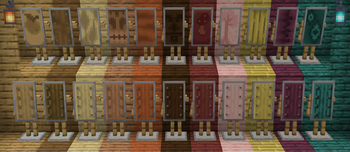
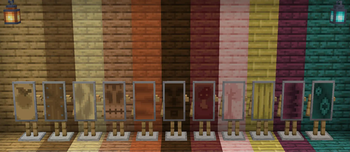
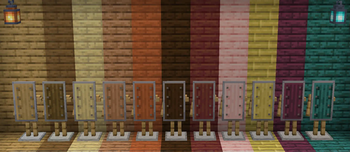
Not only can you now craft a shield of every wood type, there is also two options for each shield variant's texture.
On one hand there are custom textures unique to each different wood type designed by hypothetiKal, and then there is also a more traditional texture which is simply a recolored version of the original shield texture (which is now used as the texture of the Spruce Shield).
The texture (custom or vanilla-like) can be selected for each shield individually via the mod's config file or simply using Mod Menu.
 All textures on display - cycling through custom and vanilla-like - using More Armor Stand Variants.
Adding 11 new Shield items and 23 new Shield textures to Minecraft!
How can I craft vanilla Shields using modded wood types from Biomes o' Plenty, [Let's Do] mods, and others? Unfortunately, the vanilla Shield crafting recipe has to be overridden for the crafting of the variants to function.But usually these mods add their wood types to the Vanilla recipe, which creates a conflict. Fortunately, there is also a fairly easy way around this issue.
That is what the "More Compatibility Variants" are for:
These datapacks/mods resolve this issue across all of our "More X Variants" mods, so you can craft shields and other vanilla items/blocks just as you would expect.
Currently available More Compatibility Variants:
- Biomes o' Plenty
- [Let's Do] Meadow, (Nether)Vinery, Beachparty and Blooming Nature
- Nature's Spirit
- Oh The Biomes We've Gone
Would you like to see support for another mod with custom wood types? Let me know via Discord, GitHub, or E-Mail!
If you're interested in Shield variants not only for different woods but also different tiers/materials, please check out IMB11's Extra Shields and my accompanying More Extra Shield Variants add-on adding wood variants for all Shields from Copper to Netherite.


- Edition: Minecraft Java
- File type: .jar
- Minecraft versions listed: 26.1, 26.1.1, 26.1.2
- How to install: Install the matching mod loader (Forge, Fabric or NeoForge) for your Minecraft version. → Download the .jar. → Put it in the .minecraft/mods folder and launch that loader profile.
- Where to get it: Opens on Modrinth — not every file is mirrored on our own servers.
Install steps are the general flow for this file type — How to install Minecraft Java mods & modpacks walks through it step by step.
- Ships as MoreShieldVariants-1.4.0+26.1-Fabric.jar — drop this file into the mods folder
- Download size: 153 KB
- Download link checked 7 Oct 2026 — working
These come from our own check of the pack file, not from the source page.