
LabyModpack
Java modpack listed for Minecraft 1.20. Downloads from the MC Java Mods app on Android.
⬇ Download on ModrinthIf you having issues with the modpack, please let me know: Bug Report
LabyModpack
A modpack specially designed to run LabyMod 4 Client smootly without having multiple issues & crashes.
📥 Installation
To install LabyModpack, You will need to use LabyMod Launcher.
- Press "CTRL + Shift + M" in LabyMod Launcher.
- Click on "Fabric Mods" next to "LabyMod Addons"
- Click on filter button.
- Uncheck "Show Installed" and "Only Show Recommended"
- Check "Show Modpacks"
- Search "LabyModpack"
- Install LabyModpack
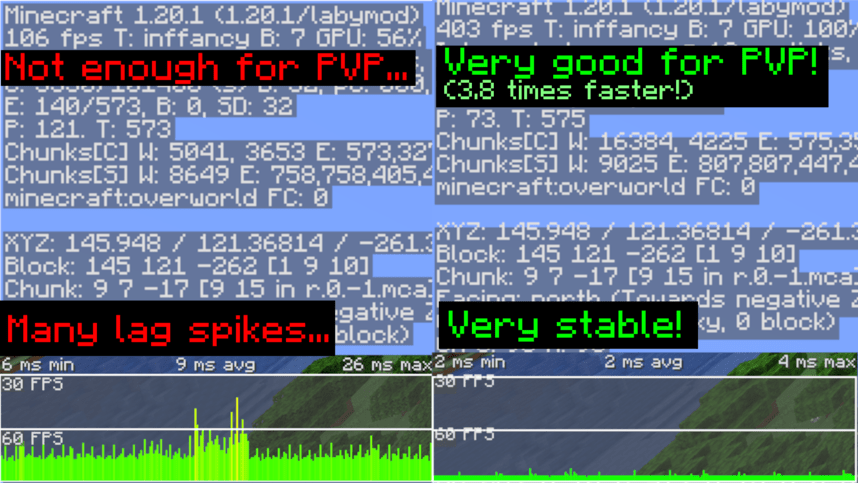
📈 Test Results
Tested on Ryzen 7 5800X, RTX 3060 and 32GB RAM.
32 Chunks Singleplayer Superflat world
Tested with Minecraft Performance Flags Benchmark
- Outdated. will update it.
| LabyMod Vanila | With LabyModpack | |
|---|---|---|
| Average FPS (Higher is better) | 817.94 FPS | 1518.73 FPS |
| Average 1% Frametime (Lower is better) | 2.96ms | 1.55ms |
| Avg FPS Variance (Lower is better) | 2563.06 | 201.41 |
❓ FAQ
Q: I can't see texts on signs when I'm far away from sign!
A: This is because of FeyTweaks mod's default settings. Go to options menu, click on icon next to Online option, click on FeyTweaks and disable "Hide text in distance"
- Edition: Minecraft Java
- File type: .jar
- Minecraft version listed: 1.20.4
- How to install: Install the matching mod loader (Forge, Fabric or NeoForge) for your Minecraft version. → Download the .jar. → Put it in the .minecraft/mods folder and launch that loader profile.
- Where to get it: Opens on Modrinth — not every file is mirrored on our own servers.
Install steps are the general flow for this file type — How to install Minecraft Java mods & modpacks walks through it step by step.
- Downloads as LabyModpack.mrpack
- Download size: 2 KB
- Download link checked 25 Oct 2026 — working
These come from our own check of the pack file, not from the source page.