
Oasis 2.0
Java mod listed for Minecraft 1.21. File opened and checked on 30 Sep 2026; downloads from the MC Java Mods app on Android.
Minecraft but in Venice, in Candyland, on the Moon - or wherever you want. Transform your game to any world or style in real time with some AI magic.
⬇ Download on Modrinth
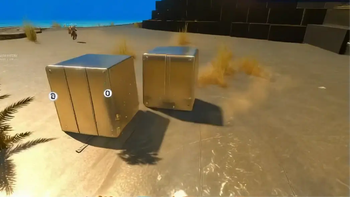
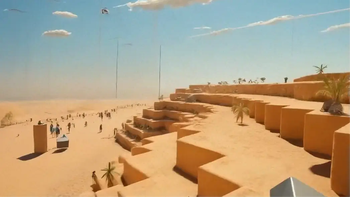



Welcome to Oasis 2.0!
Oasis 2.0 lets you transform your game into any style or world you can imagine, in real time. Think of it as a texture pack, but infinite. Like custom maps, but with no limits. And way beyond that. It's the mother of all mods.
All you need to do is type /oasis start and enter a prompt - and you'll be instantly transported. Think: Minecraft in Venice, India, New York, or Paris. Explore the jungle or Antarctica. Travel to the Wild West or medieval times. Visit a candy land, the moon, a zombie apocalypse. Or shift styles - anime, pixel art, GTA, Call of Duty… whatever you can think of. Be more creative than us. It’s cool.
Behind the scenes, Oasis 2.0 runs on a real-time video-to-video model developed by a company called Decart, called Lucy-Restyle. It transforms your Minecraft visuals live as you play. FPS may drop a bit, and resolution isn’t perfect - but hey, that just adds to the challenge.

Simple Instructions:
- Make sure you have an instance of Fabric with Minecraft v1.21.8
- Download and install the mod
- Launch Minecraft (yeah, shocking)
- To activate the model, type:
/oasis start
- Then, to change a worlds, just try:
/oasis prompt <your style>, for example:
/oasis prompt Venice in the summer
- You can temporarily hide the effect by holding the
Rkey, toggle it withV, or stop it entirely with:
/oasis stop
- Use the
[and]keys to switch between some of our favorite preset prompts for inspiration - Have a lot of fun!!
- Share with us your results and creations!!
Note: We report the MC version / OS / CPU / GPU vendor to our servers to tailor your experience and debug errors.
oasis2.decart.ai | Terms of service | Privacy policy
Contact us: contact@decart.ai | about.decart.ai
- Edition: Minecraft Java
- File type: .jar
- Minecraft version listed: 1.21.8
- How to install: Install the matching mod loader (Forge, Fabric or NeoForge) for your Minecraft version. → Download the .jar. → Put it in the .minecraft/mods folder and launch that loader profile.
- Where to get it: Opens on Modrinth — not every file is mirrored on our own servers.
Install steps are the general flow for this file type — How to install Minecraft Java mods & modpacks walks through it step by step.
- Ships as mirage-minecraft-mod-1.1.6.jar — drop this file into the mods folder
- Download size: 43.8 MB
- Download link checked 7 Oct 2026 — working
These come from our own check of the pack file, not from the source page.