Datapack Installer
Java mod listed for Minecraft 1.20–1.21. Downloads from the MC Java Mods app on Android.
A mod which allows you to select datapacks, compressed or as a folder, inside a folder during world creation without having to copy them.
I don't know my version or loader
Datapack Installer
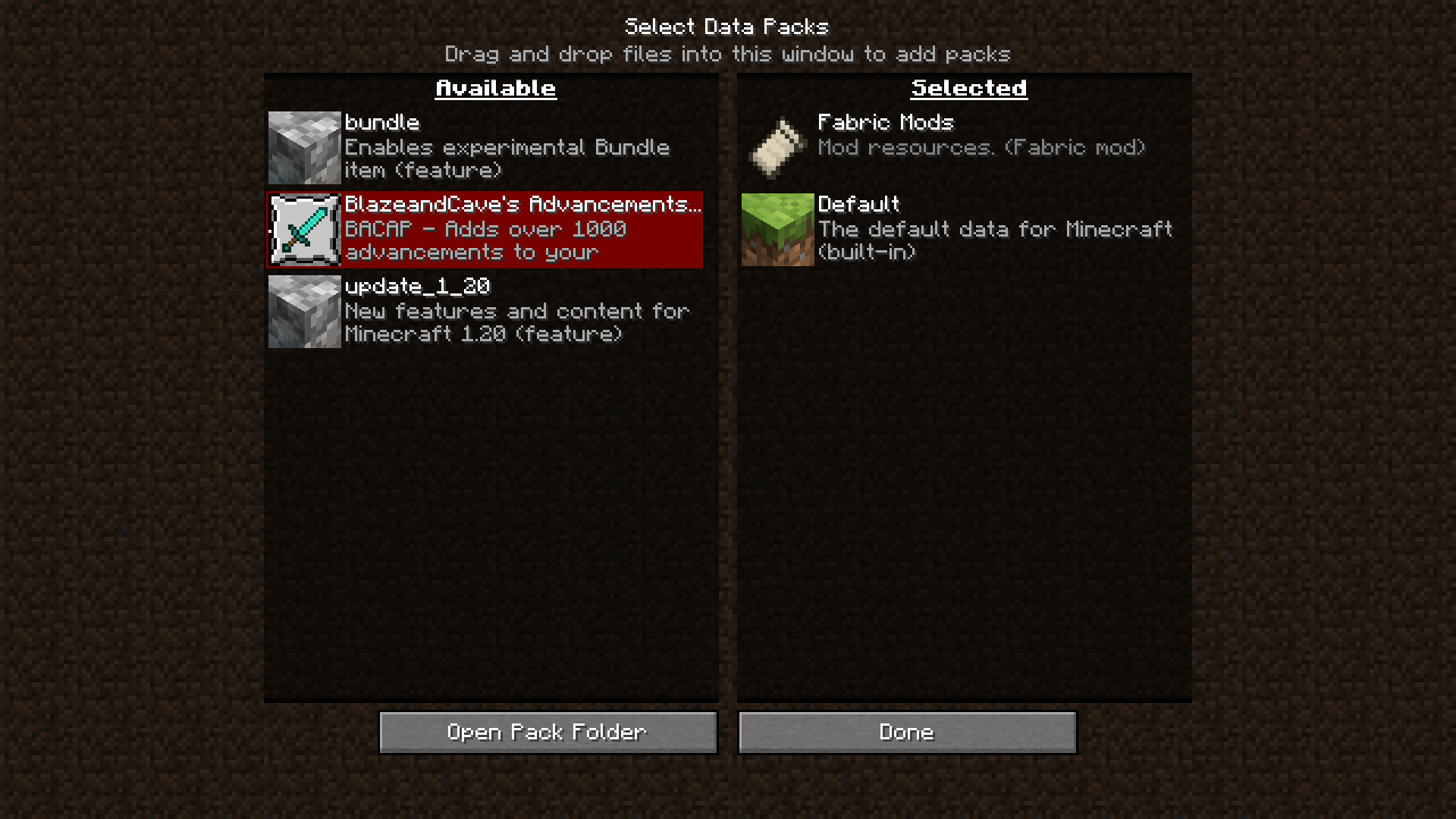
A Minecraft (Fabric) mod. When installed on the client, data packs put into the data pack folder will be available for selection during world creation as well as while paused in Singleplayer. When installed on the server, data packs put into the data pack folder will be copied to the active world when the server starts.
Advantages
On the client, this mod works with the ingame resource and data pack selector. While creating a world, or while paused in Singleplayer, you can choose which data packs to enable or disable with an interactive screen.
On the server, all that happens is that the data packs are copied from the mod's data pack folder to the world data pack folder whenever the server starts. If you are switching worlds or deleting them to regenerate often, all you will need to do is switch or delete the world, and the data packs will carry on if you leave the mod's folder intact.
Disadvantages
This mod cannot keep data packs that require feature flags enabled or disabled. For example, if you did not create a world with the built-in bundle data pack enabled, and you enable the data pack with the mod, the data pack will only be temporarily enabled until you quit the world.
Usage
Client
- Insert your desired data pack(s) into
datapacksin the game's data folder- If you have started the game with this mod installed, it should already be present.
- Begin world creation
- In the game, click Singleplayer, then click Create New World.
- Alternatively, if you already have a world, open and pause the game.
- Manage data packs
- Click the Data Packs button. On later versions, you may need to check the 'More' tab.
- The data packs should be available on the selector!
Server
- Insert your desired data pack(s) into
datapacksin the server data folder.- This is probably the root, where eula.txt and server.properties are located.
- Start the server
- The data packs will be copied to the active world.
- Edition: Minecraft Java
- File type: .jar
- Minecraft versions listed: 1.20.5, 1.20.6, 1.21
- How to install: Install the matching mod loader (Forge, Fabric or NeoForge) for your Minecraft version. → Download the .jar. → Put it in the .minecraft/mods folder and launch that loader profile.
- Where to get it: Opens on Modrinth — not every file is mirrored on our own servers.
Install steps are the general flow for this file type — How to install Minecraft Java mods & modpacks walks through it step by step.
- Ships as DatapackInstaller-2.0.0.jar — drop this file into the mods folder
- Download size: 12 KB
- Download link checked 7 Oct 2026 — working
These come from our own check of the pack file, not from the source page.