
Animated Typing
Java mod listed for Minecraft 1.21. Downloads from the MC Java Mods app on Android.
⬇ Download on Modrinth✨ Chat Typing Animations — Анимации текста в чате
🧩 ENG: This mod adds cool typing animations to the Minecraft chat!
🧩 RUS: Этот мод добавляет красивые анимации появления текста в чате Minecraft!
🛠 Settings / Настройки
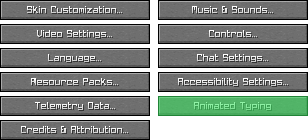
🧩 ENG: You can change animation style in-game via the settings menu:
🇷🇺 Вы можете изменить стиль анимации прямо в игре через меню настроек:
📍 ENG: Go to Options → Animated Typing
🇷🇺 Перейдите в Настройки → Animated Typing
🎨 ENG: Choose from different animation types like Fade, Grow, Scroll, etc.
🇷🇺 Выберите тип анимации: Затухание, Рост, Прокрутка и другие
💾 ENG: Your preferences are saved automatically
🇷🇺 Настройки сохраняются автоматически
🎬 Animation Showcase — Демонстрация анимаций
| 🌫️ Fade Затухание |
🌱 Grow Рост |
| 🔍 Scaling Масштабирование |
📜 Scroll Прокрутка |
| 🧵 Stretch Растяжение |
|
⚙️ Features / Возможности
- ✨ Smooth typing animations / Плавные анимации набора
- 🎨 Multiple styles / Несколько визуальных стилей
- 💬 Works in chat / Работает в чате Minecraft
📦 Installation / Установка
🧩 ENG: Download and install Fabric API
🇷🇺 Скачайте и установите Fabric API📥 ENG: Download
.jarfile of the mod
🇷🇺 Скачайте.jarфайл мода📂 ENG: Move both files to your
modsfolder
🇷🇺 Переместите оба файла в папкуmods🚀 ENG: Launch Minecraft and enjoy!
🇷🇺 Запустите Minecraft и наслаждайтесь!
❤️ Support / Поддержка
⭐ ENG: If you like this mod, please star it on GitHub!
🇷🇺 Если вам понравился мод — поставьте ⭐ на GitHub!
📣 ENG: Share it with friends or make a video showcase!
🇷🇺 Поделитесь модом с друзьями или сделайте видео-обзор!
- Edition: Minecraft Java
- File type: .jar
- Minecraft version listed: 1.21.11
- How to install: Install the matching mod loader (Forge, Fabric or NeoForge) for your Minecraft version. → Download the .jar. → Put it in the .minecraft/mods folder and launch that loader profile.
- Where to get it: Opens on Modrinth — not every file is mirrored on our own servers.
Install steps are the general flow for this file type — How to install Minecraft Java mods & modpacks walks through it step by step.
- Ships as AnimatedTyping-1.21.11+1.0.0.jar — drop this file into the mods folder
- Download size: 27 KB
- Download link checked 7 Oct 2026 — working
These come from our own check of the pack file, not from the source page.