
SkillMMO
Java mod listed for Minecraft 26.x. Downloads from the MC Java Mods app on Android.
I don't know my version or loader
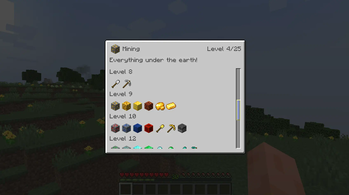
SkillMMO is a Fabric mod that adds tier-based skill progression to Minecraft.
You'll need to start out by collecting some experience in order to acquire skills that let you interact with the world around you.
Branch out into different skills to unlock the blocks and items that you need to progress.
Team up with friends and take on different skills to form a well-rounded crew of heroes!
Please note that this mod is in ALPHA. It has been tested, but please proceed with caution as it may contain bugs.
This mod does not add any new blocks, items, or entities to Minecraft, so it should not corrupt your world if something goes wrong, but do take a backup before playing with this mod if you want to be extra safe.


Skills, levels, and points
Skill levels are acquired by spending skill points on them. Skill points are obtained by collecting experience, and the formula for how much experience is needed per-level is configurable (see below).
Each skill level grants access to new blocks, items, and entities.
There are several default skill levels based on proficiencies. They are listed here with some examples of what blocks, items, and entities are gated by them:
- Agriculture - hoes, axes, plants, crops, plant-based food
- Animal Husbandry - animals, meat-based food
- Building - decoration blocks, scaffolding
- Combat - swords, bows, armour
- Engineering - redstone things, dispensers, TNT
- Mining - pickaxes, shovels, stones, ores
- Sorcery - potions, enchanting
- Storage - bundles, barrels, chests, ender chests, shulkers
- Survival - beds, compasses, buckets, boats
- Trading - villagers, wandering trader
You can see information about what level unlocks what blocks and items by opening the SkillMMO information screen. The default keybinding for this is K. See the gallery for images.
Note: unlocked entities are currently not listed in the GUI. You can find out what level is required to interact with one by right-clicking on it, or by using WTHIT.
Restrictions imposed by SkillMMO
When SkillMMO is installed, you will be unable to interact with things that you have not acquired the necessary skills for. This includes:
- Preventing placing blocks
- Getting no drops from breaking locked blocks (block breaking is slowed significantly too, but is not prevented) – however you will still get a chest's contents if broken!
- Preventing interacting with blocks (e.g. you cannot open a chest if you have not unlocked chests)
- Preventing using items
- Preventing interacting with entities (by right-clicking on them)
- Crafting with locked items, or crafting to obtain locked items (configurable)
Please note that SkillMMO adds a recipe that enables crafting bundles using the future vanilla recipe for them (that is, with 6 rabbit hide and 2 string).
Configuration
SkillMMO creates a config file at config/skillmmo.json5 using Cloth Config, which you must install in order to play SkillMMO.
All entries in the config file are set with their default values and comments explaining what each config option does.
You can use this link to preview and play with the experience equation values, which are configured in the config file: https://www.desmos.com/calculator/uljdpq8jcg.
Integration with other mods, and usage in modpacks
SkillMMO natively integrates with WTHIT if it is installed, to enable showing what skill is required to interact with a block or entity.
If you are a mod developer or a modpack maker, check out the README on GitHub for information on how you can integrate your mods with SkillMMO using datapacks.
You can register custom blocks, items, and entities with existing skills and levels, or you can choose to add entirely new skills. You can also remove items from skills or even remove entire skills or skill levels if you so wish.
Please note that you will need to add blocks that you can interact with to the #skillmmo:interactable tag in order for them to be properly prevented from being interacted with if they are locked.
You are more than welcome to use SkillMMO in a modpack, however please be aware that it is unlikely that SkillMMO has been tested with your unique combination of mods. Please report issues you find as per below.
Suggestions, feedback, and support
If you want to give feedback (good or bad), want to submit a bug report, or believe that SkillMMO is missing necessary features, please consider submitting feedback by creating an issue on the issue tracker on GitHub. I am unlikely to frequently check the mod listing here, and will tend to respond faster there. Before creating a ticket, please search to ensure there isn't a ticket covering the same thing, either open or closed (in the case of feature requests that may have been declined).
- Edition: Minecraft Java
- File type: .jar
- Minecraft versions listed: 26.1, 26.1.1, 26.1.2
- How to install: Install the matching mod loader (Forge, Fabric or NeoForge) for your Minecraft version. → Download the .jar. → Put it in the .minecraft/mods folder and launch that loader profile.
- Where to get it: Opens on Modrinth — not every file is mirrored on our own servers.
Install steps are the general flow for this file type — How to install Minecraft Java mods & modpacks walks through it step by step.
- Ships as skillmmo-0.1.13-fabric26.1.2.jar — drop this file into the mods folder
- Download size: 657 KB
- Download link checked 7 Oct 2026 — working
These come from our own check of the pack file, not from the source page.