ForceGL20
Java mod listed for Minecraft 1.17–1.20. Downloads from the MC Java Mods app on Android.
I don't know my version or loader
🚧 Updates Halted Indefinitely
As I can no longer locally test if the fix method used by this mod is still effective in newer Minecraft versions, the mod will be unsupported for the time being. You can still play Minecraft versions 1.17.x - 1.20.x using the latest version of ForceGL20, but the mod is not supported in any newer versions.
Possible alternatives for newer Minecraft releases:
- ForceGL2.0-Remapped - A fork of ForceGL20 maintained by Coredex
Even though I am not personally working on the mod anymore, pull requests to the mod's repository are still welcomed. I may come back to updating ForceGL20 in the future, and this section of the page will be removed when I decide to do so.
⚠️ Disclaimer
This mod only fixes GLFW error 65543; it will NOT work for any other error codes! If you are getting this message when you launch Minecraft, this mod may resolve your issue:
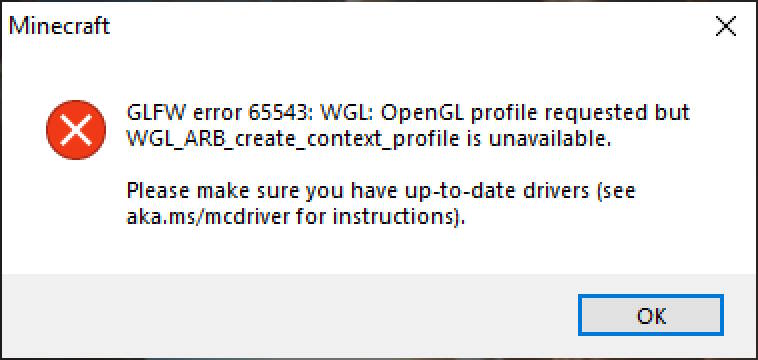
With that said, please read the mod's description below at least once, so that you understand why this mod may fix your issue with the game.
ForceGL20
ForceGL20 is a mod that allows running newer versions of Minecraft on old computers by forcing the game to use OpenGL 2.0.
Why?
Since Minecraft 1.17, the game's required OpenGL version was updated from 2.0 to 3.2. However, some graphic cards on old computers do not support OpenGL 3.2, making the game unable to launch for some players.
This Minecraft mod lowers the required OpenGL version to 2.0, just like how it was prior to Minecraft 1.17. So, if your computer can play Minecraft 1.16 fine but has issues running Minecraft 1.17, this mod is for you.
But does it work?
There have been no major issues with forcing the game to run on older OpenGL. However, note that you are forcing the game to run in an unsupported way by installing this mod, so there might be unexpected issues with other mods or resource packs.
In addition, this mod would be useless if Minecraft starts using new OpenGL features that your computer can't run in a future update. I will discontinue the support for this mod as soon as this band-aid solution stops working.
While you are free to use this mod to run newer versions of Minecraft, please do consider upgrading to a newer graphic card as soon as possible.
I found an issue!
Due to the statement above (that you are running the game in an unsupported way ), I cannot provide support for issues you may experience in this mod. This mod's only purpose is to change the OpenGL version and it does not apply any other fixes to the game's code.
It doesn't work!
Please check that you are getting GLFW error 65543 (this exact number) when you launch the game. If that number differs even by 1, it is an entirely different error that's out of this mod's scope.
- Edition: Minecraft Java
- File type: .jar
- Minecraft versions listed: 1.17.1, 1.18, 1.18.1
- How to install: Install the matching mod loader (Forge, Fabric or NeoForge) for your Minecraft version. → Download the .jar. → Put it in the .minecraft/mods folder and launch that loader profile.
- Where to get it: Opens on Modrinth — not every file is mirrored on our own servers.
Install steps are the general flow for this file type — How to install Minecraft Java mods & modpacks walks through it step by step.
- Ships as forcegl20-forge-1.1.0.jar — drop this file into the mods folder
- Download size: 12 KB
- Download link checked 7 Oct 2026 — working
These come from our own check of the pack file, not from the source page.