
AutoRelog
I don't know my version or loader
AutoRelog


A mod that lets you automatically reconnect to a restarting Minecraft server when AFK.
Make sure to have proper overflow protection in your farms!
Using AutoRelog
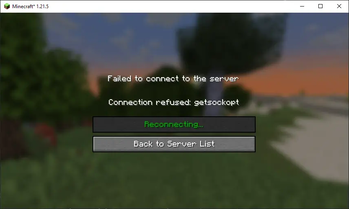
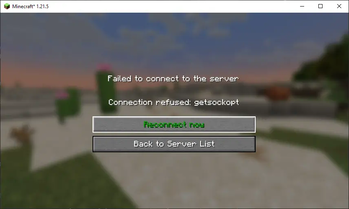
When getting disconnected from a server with AutoRelog active (see AFK Detection), the disconnect screen will show a button with a countdown before it will try to automatically reconnect to the server:

Hovering on the button will give you the option to try reconnecting right away. This can be used if you know the server is accessible again before the countdown is over:

When AutoRelog is trying to reconnect the button becomes inactive:

AFK Detection
AutoRelog wil automatically try to reconnect 60 seconds after you are disconnected. If you
want to activate AutoRelog manually, check out the Mod Menu settings, or change the setting
in the autorelog.json file to "mode": "AUTOMATIC".
Type /autorelog to activate automatic reconnection after 60 seconds.
Leave the server or use /autorelog again to deactivate.
FAQ
Will AutoRelog be backported to Minecraft 1.x.x?
Since we use Stonecutter now (#37) it's much easier to backport to older versions. But since I don't necessarily play those old versions, I'll wait with backporting further than 1.19 for now.
If you play on an older version, and you want to use AutoRelog, just create a ticket titled "1.18 support" or something, and I'll see if I have time for it.
Version 1.x.x of AutoRelog crashes/doesn't work
All the versions should work, but sometimes I miss something in the changes in Minecraft, Fabric, or the Yarn mappings. If you encounter any crashes or other issues just create a ticket, and I'll test for that version specifically.
Will AutoRelog be ported to Forge/Neoforge?
I mostly play with Fabric mods, so I don't really have a need for a Forge version of AutoRelog. However, adding support might be something I'd like to add in the future.
Contributing
If you want to help out by creating a pull request, please add version updates to a separate pull request.
Thanks for your contribution!
- yichifauzi and notlin4 for Chinese translations
- EEHoveckis for Latvian translations~~~~
- Edition: Minecraft Java
- File type: .jar
- Minecraft versions listed: 1.20.5, 1.20.6
- How to install: Install the matching mod loader (Forge, Fabric or NeoForge) for your Minecraft version. → Download the .jar. → Put it in the .minecraft/mods folder and launch that loader profile.
- Where to get it: Opens on Modrinth — not every file is mirrored on our own servers.
Install steps are the general flow for this file type — How to install Minecraft Java mods & modpacks walks through it step by step.
- Ships as autorelog-1.0.2+1.20.5-1.20.6.jar — drop this file into the mods folder
- Download size: 69 KB
- Download link checked 17 Sept 2026 — working
These come from our own check of the pack file, not from the source page.