Drogstyle
Java mod listed for Minecraft 26.x. Downloads from the MC Java Mods app on Android.
⬇ Download on Modrinth
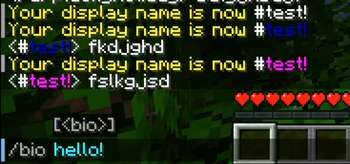
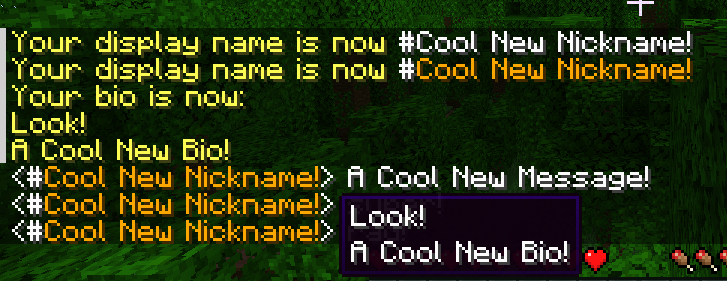 Simple, self-assignable display names.
Requires Styled Nicknames.
Requires Connector and FFAPI on (neo)forge.
Drogstyle adds the following commands:
/nick [name]: set your display name, with Placeholder Simplified Text Format available/color [color]: set your name color, vanilla colors or #RRGGBB/bio [bio]: set your name bio (tooltip), with\nfor newlines
All commands can be called on their own to clear the set value.
Limitations
None of the above commands offer any kind of permissions system, and won't.
Drogstyle force-allows self-assignment permissions in styled nicknames using a mixin.
Drogstyle removes all original styled nicknames commands to avoid clashes.
Utility Commands
Player usernames can be checked via hovering over name formatting (e.g. #), or clicking.
/drogstyle username [name]: look up a player's username via their display name/execute as [username] run nick: clear another player's username/drogstyle reload: reload the styled nicknames configuration
Afterword
All mods are built on the work of many others.
This mod specifically exists out of respect for the design of Drogtor The Nickinator, and seeks to continue it with the power and flexibility of Styled Nicknames - over which drogstyle is only a thin wrapper! - please support the original mods, and don't send them drogstyle-related issues.
This mod is included in Tinkerer's Quilt - our modpack about rediscovering vanilla.
We're open to better ways to implement our mods. If you see something odd and have an idea, let us know!
Tinkerer's: Quilt - Smithing - Origins - Statures - HUD
Loveletters: Tabs - Atlas - Portable Crafting - Drogstyle
Others: Switchy - Crunchy - Starcaller
- Edition: Minecraft Java
- File type: .jar
- Minecraft version listed: 26.1
- How to install: Install the matching mod loader (Forge, Fabric or NeoForge) for your Minecraft version. → Download the .jar. → Put it in the .minecraft/mods folder and launch that loader profile.
- Where to get it: Opens on Modrinth — not every file is mirrored on our own servers.
Install steps are the general flow for this file type — How to install Minecraft Java mods & modpacks walks through it step by step.
- Ships as drogstyle-1.3.5+26.1.jar — drop this file into the mods folder
- Download size: 320 KB
- Download link checked 7 Oct 2026 — working
These come from our own check of the pack file, not from the source page.