
FPS hud
Java mod listed for Minecraft 26.x. Downloads from the MC Java Mods app on Android.
I don't know my version or loader
FPShud,
a mod that displays FPS with high precision on a customizable HUD
Mod features:
Main FPSis the main FPS value, regulated by theMain Update IntervalAvererage FPSis the average FPS value from all the values took inAverage Update IntervalMax FPSis the maximum FPS value from all the values took inMin Update IntervalMin FPSis the minimum FPS value from all the values took inMax Update Interval

FPShud with default settings
HUD Features:
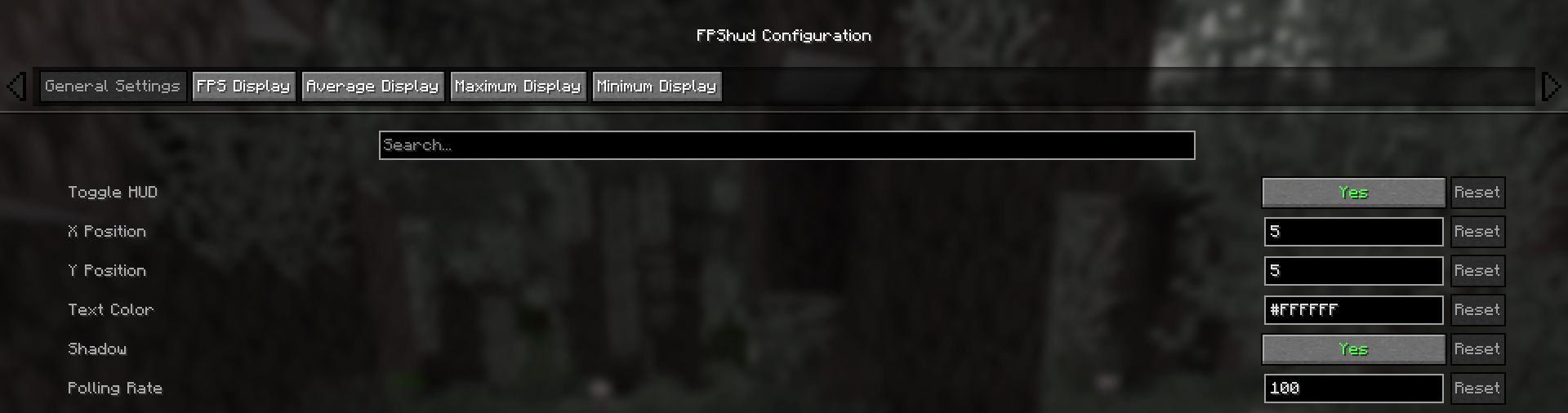
- General Settings:
Toggle HUDtoggles the entire HUDX Positionchanges the X position of the HUD on the screenY Positionchanges the Y position of the HUD on the screenText Colorchanges the color of the entire HUDShadowenables or disables the text shadow on the HUDPolling Rateindicates how frequently the mod should poll FPS
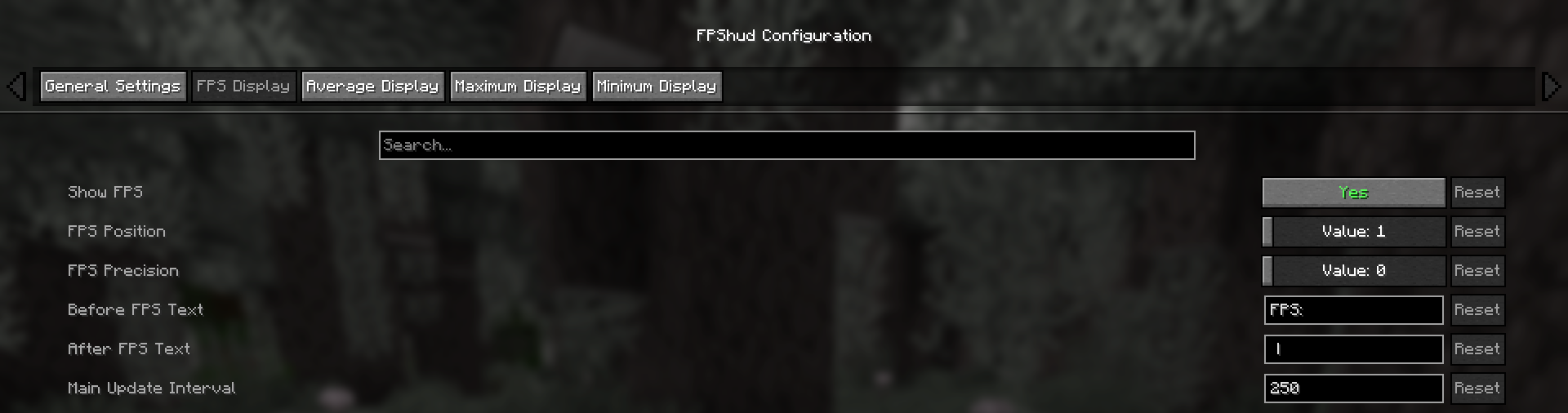
- FPS Display, Average Display, Maximum Display, Minimum display
Those settings can be changed for every one of the 4 fields:
Show FPStoggles the FPS fieldFPS Positionindicates the position of the field (first, second, third, fourth)FPS Precisionindicates how many points of precision the field haveBefore FPS Textchanges the text displayed before the specific field FPS valueAfter FPS Textchanges the text displayed after the specific field FPS value
ModMenu config:
- GUI config is accessible from the ModMenu mods list
The config screen is divided into 5 categories:
- General Settings:
- FPS Display, Average Display, Maximum Display, Minimum display:
Why FPShud?
Highly precise:
FPShud uses time elapsed from frame to frame for the FPS value calculation; This method of sampling elevates precision and customization, permitting millisecond precise calculations and FPS displaying
FPShud works with a
Polling Ratealgorithm; samples are taken every frame, then smoothen every poll-time and finally processed to make them match the requiredMain Update Interval,Average Update Interval,Maximum Update IntervalandMinimum Update IntervalrequirementsFor those reasons, it is not recommended to set
Polling RateandUpdate Intervalto low values because results may appear very fluctuating
Highly customizable:
You can customize the HUD to match every style:

only showing Avr and Max, modified 'Before Text', changed 'Text Color', removed 'Shadow', changed 'Precision' and modified 'Update Intervals'
Other:
If you are using ModMenu install ClothConfigAPI to access the config screen
Don't want ModMenu? The config file is accessible and editable in your config directory, changes apply after a game restart
Settings will be saved in your config folder and updated at runtime
The mod is client side (works on multiplayer)
Links:
- Edition: Minecraft Java
- File type: .jar
- Minecraft versions listed: 26.1, 26.1.1, 26.1.2
- How to install: Install the matching mod loader (Forge, Fabric or NeoForge) for your Minecraft version. → Download the .jar. → Put it in the .minecraft/mods folder and launch that loader profile.
- Where to get it: Opens on Modrinth — not every file is mirrored on our own servers.
Install steps are the general flow for this file type — How to install Minecraft Java mods & modpacks walks through it step by step.
- Ships as fpshud-1.1.3+26.1-26.1.2.jar — drop this file into the mods folder
- Download size: 181 KB
- Download link checked 7 Oct 2026 — working
These come from our own check of the pack file, not from the source page.