HomeJavaResourcepacksChat Reporting Helper
Chat Reporting Helper
ResourcepacksJava

Chat Reporting Helper

by robotkoer · on Modrinth

Which Minecraft do you have?

Every version of the game needs its own build. Pick yours, then download — the wrong build installs fine and then does nothing in the game. This mod is built for Resource pack only.

⬇ Download for 1.20.2–26.2⬇ Download for 1.20–1.20.1⬇ Download for 1.19.4
I don't know my version or loader
Open the Minecraft launcher and look at the profile you play on — it names both, like fabric-loader-1.21.4. The version also shows in the bottom-right corner of the game's main menu.
No loader in the profile name? Then it's plain Minecraft, and these mods won't run — you need Fabric or NeoForge installed first.
Chat Reporting Helper — screenshot 1Chat Reporting Helper — screenshot 2Chat Reporting Helper — screenshot 3Chat Reporting Helper — screenshot 4Chat Reporting Helper — screenshot 5Chat Reporting Helper — screenshot 6Chat Reporting Helper — screenshot 7Chat Reporting Helper — screenshot 8

As seen on Fabulously Optimized!

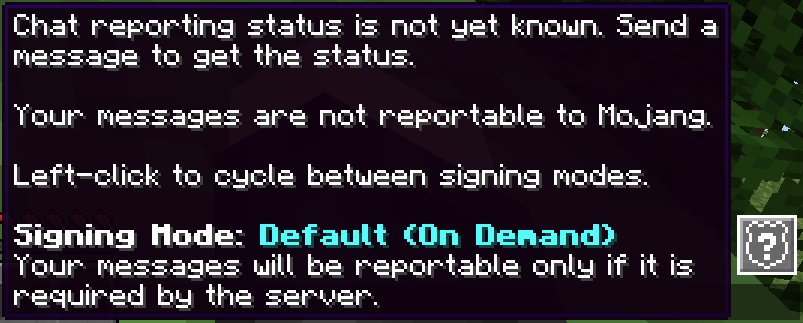
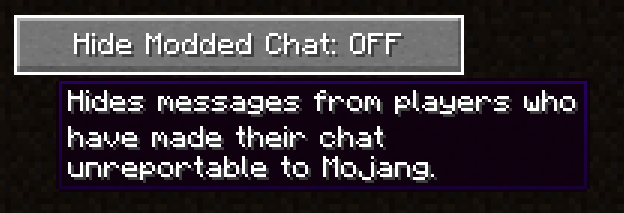
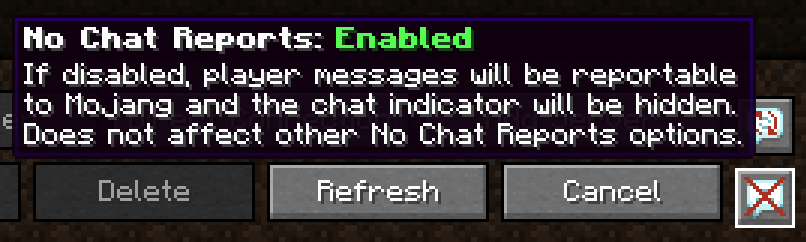
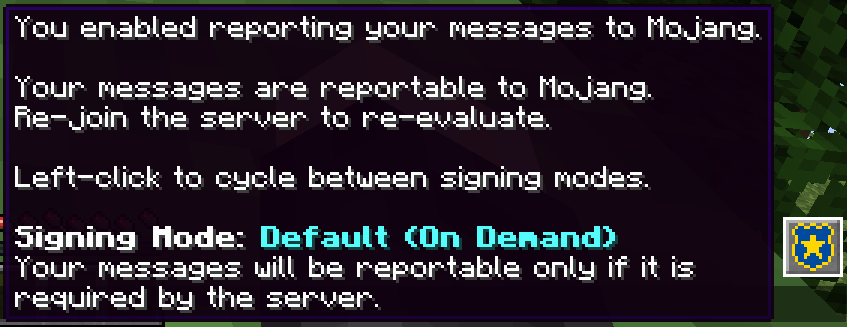
Minecraft's default in-game wording about chat reportability is technical, confusing and gives the assumption that chat reportability exists in every server. No Chat Reports' wording is also technical, biased towards negativity and very detailed. This resource pack fixes both by replacing those phrases with simple and unbiased, yet accurate phrases.

What this resource pack does

What this resource pack doesn't do

What do the icons mean?

The icons are only shown when you have No Chat Reports installed. For vanilla chat indicators, hover the gray box on the left.

Who is this resource pack for

Even more questions

Q: Do I have to use this with No Chat Reports?

A: No, though it is recommended to get more accurate status icons.

Q: Do I have to configure No Chat Reports a certain way to benefit from this?

A: It has to be enabled and not whitelisting by default to get the indicator icons, any other changes are up to you. You may configure it to skip prompts automatically (set "Default signing mode" to "On Demand") to make the experience smoother.

Q: Should I install No Chat Reports if I like chat reportability?

A: Yes, it is still recommended, as it is currently the only way to get a consistent indicator about the system being active on the server. Remember, the mod always respects the server's intent and does not contain any hacks or exploits.

Q: Why is this not in No Chat Reports itself?

A: No Chat Reports' default phrases do a better job at describing the technical details and giving users traffic light-like indicators to assist on avoiding chat reports. This resource pack is meant to be a more neutral approach similar to Steam's "VAC-secured" indicator - any user can make their own call on whether seeing the shield icon is a bad or good thing. I really hope Mojang will implement something like this in the vanilla game one day.

Edit: Mojang implemented a similar badge in their new online server list, but not yet in-game and no Java Edition servers have it.

Q: Does this replace every chat reportability-related phrase and icon?

A: No, only the minimum that is required for clear understanding.

Q: What about skin and username reporting?

A: As of version 3.0, the pack has been updated to reflect the new reporting selection screen. However, most of the features of this resource pack are still only focused on chat.

Q: I don't see the changed phrase where I should see it.

A: That might be due to a lack of resource pack translation in your language, so default phrases are displayed as a fallback. Please contribute!

Q: Can I contribute translations to my language?

A: Yes, please do! Join the Crowdin project and start translating.

Q: Where can I learn more about player reporting?

A: I have made a detailed writeup for my modpack Fabulously Optimized.

Q: Backports?

A: No. This is intended for Minecraft 1.19.4 and up, because both Minecraft and No Chat Reports have made some drastic changes compared to 1.19.3 and older.

Quick facts

Install steps are the general flow for this file type — How to install Minecraft Java resource packs walks through it step by step.

Verified by MCModsHub

These come from our own check of the pack file, not from the source page.
📺 Java videos for Chat Reporting Helper watch on YouTube ↗

Minecraft Chat TrickYouTubeMinecraft Chat TrickCheezyChezChatGPT for Minecraft Mods is here! Make mods in less than 10 minutes with zero experience!YouTubeChatGPT for Minecraft Mods is here! Make mods in less than 10 minutes with zero experience!Fawn
🎬Made a video about Chat Reporting Helper? Feature it #1 here for free — put the mcmodshub.com link near the top of your description, or in a pinned comment.

Explore more