
Damage Number Particles
Damage Number Particles is a lightweight Minecraft mod that displays floating number particles whenever an entity takes damage or receives healing. This feature provides real-time visual feedback, helping players easily track combat effectiveness or healing output during gameplay.
Requirements
This mod requires the following dependencies to work properly:
For versions below 0.0.5+1.21.9
| Modrinth | Curseforge |
|---|---|
| Smootheez Config Lib (scl) | Smootheez Config Lib (scl) |
For versions 0.0.5+1.21.9 and above
| Modrinth | Curseforge |
|---|---|
| Smoothiez API | Smoothiez API |
| Fabric API | Fabric API |
Preview
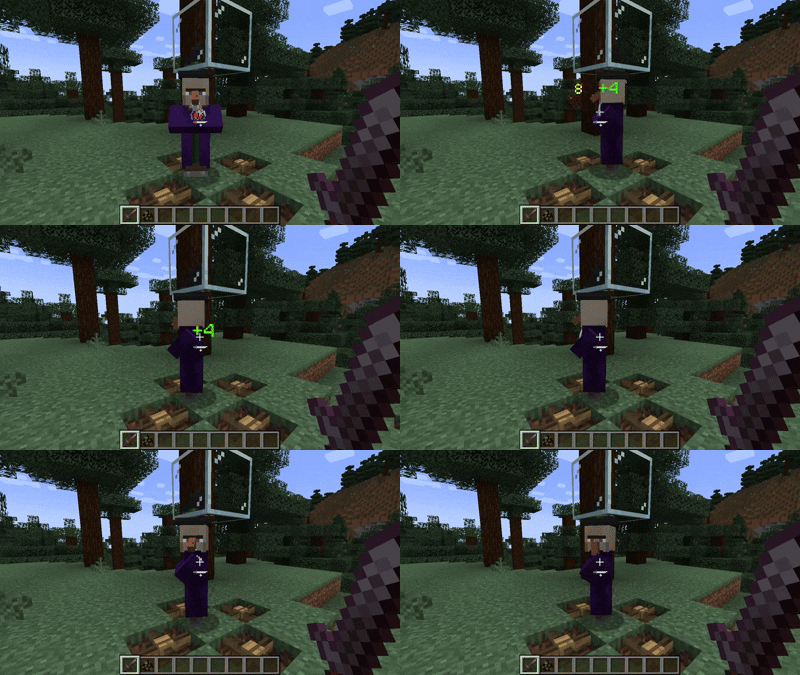
Experience floating numbers that dynamically appear above entities as they take damage or receive healing — all rendered smoothly in real time.
Configuration
Damage Number Particles can be fully customized to match your preferences. You can modify settings either in-game (via Mod Menu) or manually through the config file.
Available Options
- Toggle particle visibility
- Adjust display radius and minimum damage threshold
- Manage an entity blacklist to prevent certain mobs from displaying particles
To blacklist an entity, add its identifier in the following format:
id:entity_identifier
Example:
minecraft:allay
Download
Get the latest version from your preferred platform:
| Modrinth | Curseforge |
|---|---|
| Damage Number Particles | Damage Number Particles |
Reporting Issues
Found a bug or want to suggest a new feature? Please open an issue on GitHub: GitHub Issues
Support My Work
If you enjoy this mod and want to support future development, consider donating:


- Edition: Minecraft Java
- File type: .jar
- Minecraft version listed: 1.21.11
- How to install: Install the matching mod loader (Forge, Fabric or NeoForge) for your Minecraft version. → Download the .jar. → Put it in the .minecraft/mods folder and launch that loader profile.
- Where to get it: Opens on Modrinth — not every file is mirrored on our own servers.
Install steps are the general flow for this file type — How to install Minecraft Java mods & modpacks walks through it step by step.
- Ships as dnp-0.0.8+1.21.11.jar — drop this file into the mods folder
- Download size: 25 KB
- Download link checked 28 Aug 2026 — working
These come from our own check of the pack file, not from the source page.