HomeJavaModsSimple Voice Chat Soundboard
Simple Voice Chat Soundboard
ModsJava

Simple Voice Chat Soundboard

by Twyco · on Modrinth

⬇ Download on Modrinth
Simple Voice Chat Soundboard — screenshot 1Simple Voice Chat Soundboard — screenshot 2Simple Voice Chat Soundboard — screenshot 3

Simple Voice Chat Soundboard

A client-side soundboard mod for Simple Voice Chat. Play your own sounds through voice chat so everyone using Simple Voice Chat can hear them.

This is not an official Simple Voice Chat addon. Please do not ask for support in the Simple Voice Chat Discord server. Instead, use the GitHub issue tracker; I will try to help as soon as possible.

Features

Dependencies

Quick Start

  1. Launch the game once so the sounds folder is created in your Minecraft instance.
  2. Put your .mp3 files into that folder.
  3. Open the Soundboard Config screen with O by default.
  4. Assign keybinds to your sounds and, optionally, to the sound wheel.
  5. Use the keybinds in singleplayer or multiplayer to start a sound; use the same keybind again to stop it.

GUI and Usage Guide

Currently Playing Sounds

All currently playing sounds are shown in a small HUD at the bottom-right of the screen. Looping sounds are marked accordingly. You can disable this indicator in the settings.

Currently Playing Sounds HUD

Sound Wheel

Assign a keybind to Open Sound Wheel in the General tab. By default, the wheel stays open while you hold the keybind. You can instead enable toggle mode and optionally close the wheel after playing a sound.

The wheel shows six alphabetically sorted sounds per page. Change pages with the mouse wheel, the left and right arrow keys, or the clickable page arrows. Hover over a sound and left-click it to start or stop it. Indicators show which sounds are currently playing or set to loop, and you can keep walking, jumping, sneaking, and sprinting while the wheel is open.

Sound Wheel

Local Soundboard Volume

Change how loud the soundboard is for you with the Soundboard category in Simple Voice Chat's Adjust Volumes menu. This only affects local playback and does not change the amplifier or how loud other players hear the sounds.

Adjust Soundboard Volume

Settings

Open the custom Minecraft-style config screen with O by default. You can change this key in Minecraft's Controls menu. Use Apply to save without closing the screen, or Done to save and close it.

General

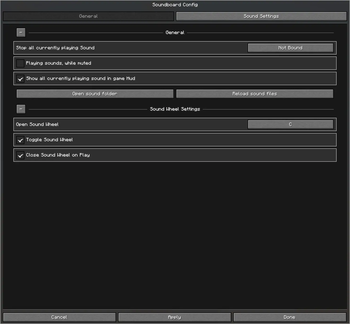
The General tab contains the global options and keybinds. Its persistent, collapsible sections let you:

General Settings

Sound Settings

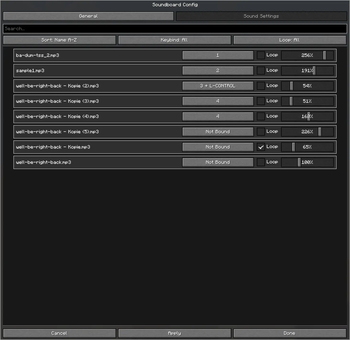
The Sound Settings tab lists all .mp3 files detected in your sounds folder. Search by name, sort from A-Z or Z-A, and filter sounds by whether they have a keybind or use looping.

Each sound can be customized individually:

Sound Settings

Quick facts

Install steps are the general flow for this file type — How to install Minecraft Java mods & modpacks walks through it step by step.

Verified by MCModsHub

These come from our own check of the pack file, not from the source page.

Explore more