HomeJavaModsTellus
Tellus
ModsJava

Tellus

by yucareux · on Modrinth

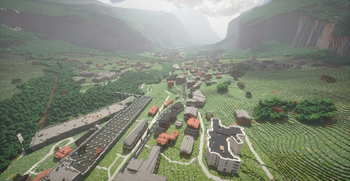
Tellus is a mod that recreates real-world terrain, buildings and roads in Minecraft by generating Earth-scale landscapes from geographic and OSM data.

⬇ Download on Modrinth
Tellus — screenshot 1Tellus — screenshot 2

Tellus

Tellus is a mod that replicates real-world terrain, roads and buildings in Minecraft by converting various open-sourced geographical datasets into chunks in real-time. It focuses on realistic elevation (30m globally with more detailed coverage for areas that support it), biome placement, cities, buildings, and climate-driven time and weather, aiming to transform Minecraft into a playable, voxelised map of the Earth.

Mount Rainier

Inspired by and partially based on Gegy’s Terrarium: https://modrinth.com/mod/terrarium

Survival note: Some survival features are still missing (including certain features and biomes). While a survival world is possible, upcoming updates may break those worlds; for now Tellus is better suited for testing and exploration than long-term survival.

Internet & data note: Tellus requires an active internet connection and will not work offline. It gradually streams terrain datasets, (e.g. land cover, climate, and weather data) so expect ongoing data usage that varies with how much of the world you explore.

Server support note: Tellus must be installed on the server, but is not required on clients. Official server support is not available yet; for now you should create the world in singleplayer first, then move that world to the server (with Tellus installed) so new chunks generate with Tellus.

Note: generative AI was used to assist with the creation of this mod.

Features

Distant Horizons Integration

Tellus supports Distant Horizons to render planet-scale terrain far beyond vanilla view distance. When DH is installed, distant terrain is built using Tellus data and settings instead of generic vanilla sampling.

Because Tellus worlds are Earth-scale, use of DH or Voxy is strongly recommended and is almost essential for comfortable exploration and long-distance views.

Some commands

More commands will be added over time.

Settings

These options are available in the "Customize World Generation" screen when creating a Tellus world.

Configuration UI

World Settings

Ecological Settings (work in progress)

These options are currently locked and not adjustable yet. They describe what will be configurable in a future update.

Geological Settings

The cave and underground generation system is still work in progress, so expect changes here.

Structure Settings

This section lets you toggle vanilla structures and world features on or off, such as villages, temples, monuments, ruins, and underground features like Deep Dark and amethyst geodes. Some structures (notably Deep Dark and certain ocean structures) may not generate properly yet and are still work in progress.

Real-Time Settings

Compatibility Settings

Cache

Data Sources

ESA WorldCover 2021 (land cover)

Koppen-Geiger climate classification

Terrain Tiles (global DEM tiles)

Open-Meteo (weather)

Quick facts

Install steps are the general flow for this file type — How to install Minecraft Java mods & modpacks walks through it step by step.

Verified by MCModsHub

These come from our own check of the pack file, not from the source page.

Explore more