
The Fabric/Quilt version requires Cloth Config!
It is also highly recommended to install TooltipFix for the best experience.
This little client side mod was greatly inspired by Enchantment Descriptions by Darkhax and does a similar thing for potions. When you are sneaking (configurable), potion tooltips will display effect descriptions. No more forgetting what all these status effects do!
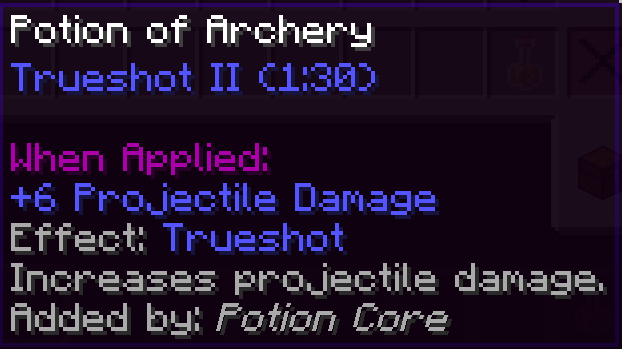
Currently, descriptions are available for any items that use the same NBT structure as vanilla potions and suspicious stews (configurable), but there is explicit support for some potion-like items from other mods! See below for the full list.
Supported mods (Forge)- Actually Additions (1.12.2 only)
- Botania
- Reliquary
- Rustic (1.12.2 only)
If you want to contribute to this list or add localization for your language, pull requests are highly appreciated! ;)
To add a description, you need to insert the following line to the language file:
POTION.description=Description (1.19.2)
description.POTION=Description (pre 1.19.2)
where POTION is the name of the potion effect. When in doubt, you can enable logging of missing descriptions in the config.
- Edition: Minecraft Java
- File type: .jar
- Minecraft version listed: 1.19.2
- How to install: Install the matching mod loader (Forge, Fabric or NeoForge) for your Minecraft version. → Download the .jar. → Put it in the .minecraft/mods folder and launch that loader profile.
- Where to get it: Opens on Modrinth — not every file is mirrored on our own servers.
Install steps are the general flow for this file type — How to install Minecraft Java mods & modpacks walks through it step by step.
- Ships as potiondescriptions-1.19.2-1.8-forge.jar — drop this file into the mods folder
- Download size: 45 KB
- Download link checked 28 Aug 2026 — working
These come from our own check of the pack file, not from the source page.