
Woodland Fox Verses
林间狐咏
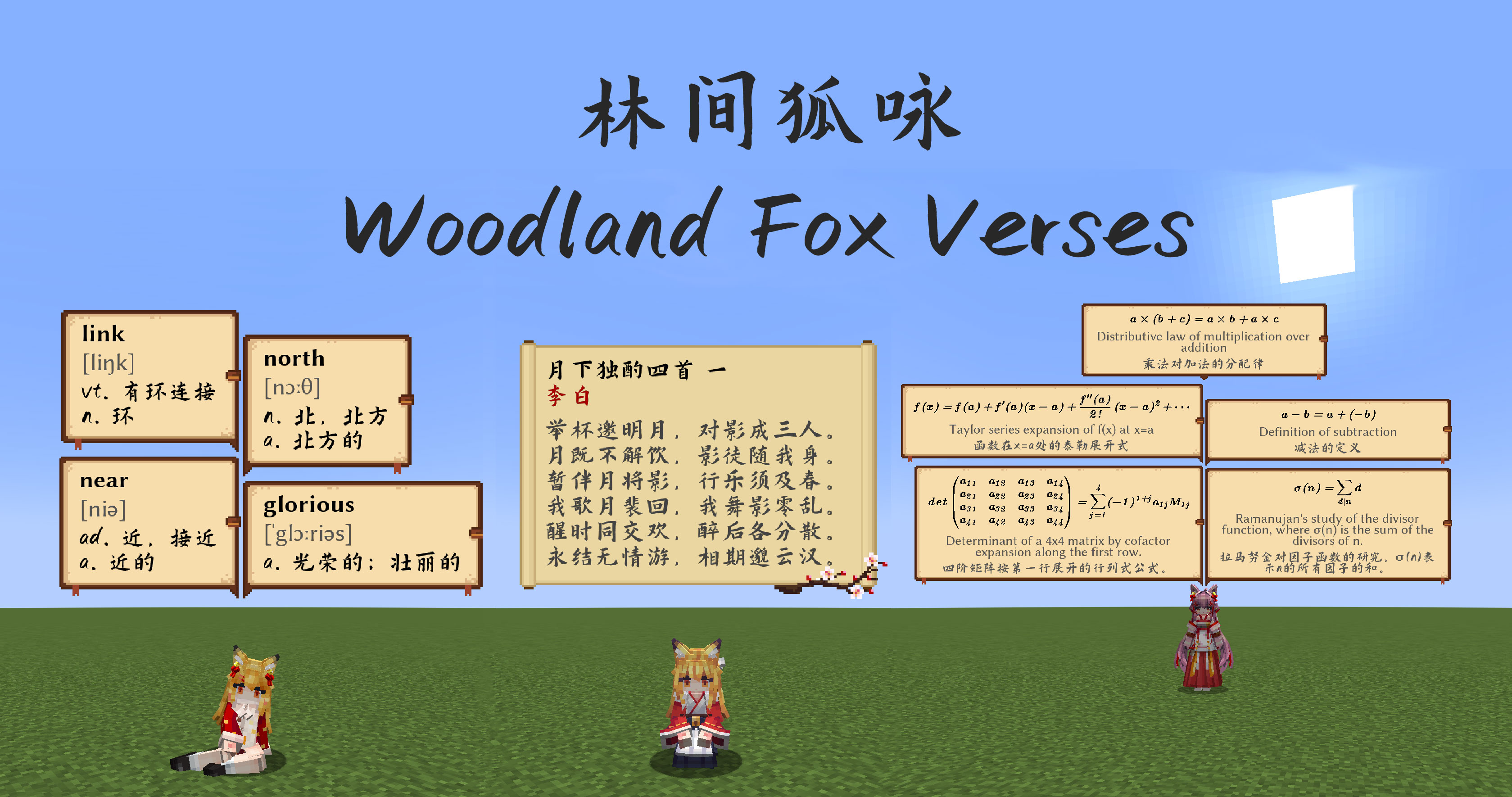
Display various texts such as poetry, vocabulary, math formulas, and more in chat bubbles.
"When the moonlight passes through the pine branches, you may encounter the well-read fox—"
Introduction
This is an add-on mod for the Minecraft maid mod (Touhou Little Maid Mod) that randomly displays various chat bubbles in-game. Currently integrated content includes:
- 300 Tang and Song poems
- English vocabulary for junior high, senior high, and CET-4/CET-6 college levels
- Classic mathematical formulas
Acknowledgements
- Chat bubble textures generously provided by YSBB
- chinese-poetry project
- Common English Wordlists
- ChillCalligraphy Font (Hanchan Shuti)
- Libertinus Font
Others
- Mathematical formulas are generated by GPT-4.1, and related content can be found in the here
KubeJS Support
You can now use KubeJS to add game tips:
// You need to create JS scripts in the server_scripts directory to add tips

// Add tips in all biomes using the addTipInAllBiome method
WoodlandFoxVerses.addTipInAllBiome("Press F3 to view coordinates and biome information")

// You can add \n for line breaks, and the game will automatically wrap long text
WoodlandFoxVerses.addTipInAllBiome("Two roads diverged in a yellow wood,\nAnd sorry I could not travel both")
WoodlandFoxVerses.addTipInAllBiome("To be or not to be, that is the question:\n" +
                                   "Whether 'tis nobler in the mind to suffer the slings and arrows of outrageous fortune,\n" +
                                   "Or to take arms against a sea of troubles and by opposing end them.")

// Add tips in specific biomes using the addTipInBiome method
// The second biome parameter can be a biome ID or biome tag
WoodlandFoxVerses.addTipInBiome("This is the Nether Wastes, featuring vast lava seas and scattered glowstone clusters", "minecraft:nether_wastes")
// Don't forget that tags need to start with #
WoodlandFoxVerses.addTipInBiome("You are in a plains biome where villages can generate", "#minecraft:has_structure/village_plains")

// Of course, the chat bubble background is also customizable. You can reference existing textures for customization (using nine-slice mechanism)
// Textures need the full path with .png extension
WoodlandFoxVerses.addTipInAllBiomeWithBg("This is a tip with custom background", "woodlandfoxverses:textures/verses.png")

// Since the Woodland Fox Verses mod adds math formulas, English words, and classical poetry by default
// Some people might just want to use it for game tips, so we also provide KJS interfaces to forcibly disable these features
WoodlandFoxVerses.showWords(false) // Disable English word display
WoodlandFoxVerses.showPoetry(false) // Disable classical poetry display
WoodlandFoxVerses.showMathFormula(false) // Disable math formula display

// You can also forcibly specify the bubble display duration and frequency
WoodlandFoxVerses.bubbleAddInterval(60) // Attempt to display a bubble every 60 ticks
WoodlandFoxVerses.bubbleShowDuration(40) // Each bubble disappears after displaying for 40 ticks
Quick facts
- Edition: Minecraft Java
- File type: .jar
- Minecraft version listed: 1.21.1
- How to install: Install the matching mod loader (Forge, Fabric or NeoForge) for your Minecraft version. → Download the .jar. → Put it in the .minecraft/mods folder and launch that loader profile.
- Where to get it: Opens on Modrinth — not every file is mirrored on our own servers.
Install steps are the general flow for this file type — How to install Minecraft Java mods & modpacks walks through it step by step.
Verified by MCModsHub
- Ships as woodlandfoxverses-1.2.0-neoforge+mc1.21.1.jar — drop this file into the mods folder
- Download size: 6.7 MB
- Download link checked 18 Sept 2026 — working
These come from our own check of the pack file, not from the source page.