
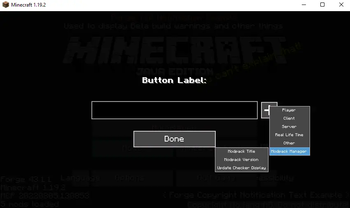
Are you tired of installing too many mods for interface changes?
Are you tired of not finding an update check tool mod for your modpack?

So this is for YOU! a Modpack Manager.
A Loyal assistantI designed this mod to make things easier for the modpack creators. And it has some features! You can change the window title, And check for a newly released update. You can change and adjust values in the config file as it suits you! It's a client-side mod! You don't have to install it on the server. For more information on how to get started, Visit the Wiki page!
Dependencies:
- FancyMenu 2.3.6+ (Optional)
Mod Features:
Update Check Function (It will add a new button to the title screen! And you can now check if there is a new update available)
Window Title Changer (It's not just a title changer! It has a lot of functions than you think.)
FancyMenu Compatibility (It has compatibility with FancyMenu Mod! You can use the same features in more stylish ways)
Durability Display (It shows the durability on top of the items in-game UI, and you can switch OFF/ON and change the display size via KeyBinds whenever you want!)
Future Planning:
- Custom Loading Screen
- Customizable HUD
More Suggestions:
If you have any ideas that you think I should consider adding in the next update, Don't hesitate to write them down on the GitHub page! I will appreciate it.
FAQ:
Can I use this mod in my modpack?
- Sure! You can use it freely.
Can I repost this mod on another website?
- No! Let's be sensible. It's like when you worked hard on something and got stolen in the end!
- Edition: Minecraft Java
- File type: .jar
- Minecraft version listed: 1.20.1
- How to install: Install the matching mod loader (Forge, Fabric or NeoForge) for your Minecraft version. → Download the .jar. → Put it in the .minecraft/mods folder and launch that loader profile.
- Where to get it: Opens on Modrinth — not every file is mirrored on our own servers.
Install steps are the general flow for this file type — How to install Minecraft Java mods & modpacks walks through it step by step.
- Ships as packmger-fabric-1.20.1-v0.1.0-beta.jar — drop this file into the mods folder
- Download size: 161 KB
- Download link checked 18 Sept 2026 — working
These come from our own check of the pack file, not from the source page.