
LootRun
Java mod listed for Minecraft 1.20. Downloads from the MC Java Mods app on Android.
LootRun is a loot–extract gameplay mod for Minecraft 1.20.1 Forge, inspired by hardcore extraction shooters like Delta Force: Hawk Ops and Escape from…
⬇ Download on ModrinthLootRun Mod: Hardcore Loot-and-Extract Experience
LootRun is a loot-extraction gameplay mod for Minecraft 1.20.1 Forge, inspired by hardcore extraction shooters such as Delta Force: Hawk Ops and Escape from Tarkov.
Prepare in your hideout, accept contracts, join timed raids into random or custom dimensions, scavenge, fight, complete objectives, and reach the extraction point before time runs out. Successfully extracted items are saved to your persistent global stash. Failure means losing most of what you found, unless protected by insurance.
Part One: Player Essentials
Hideout
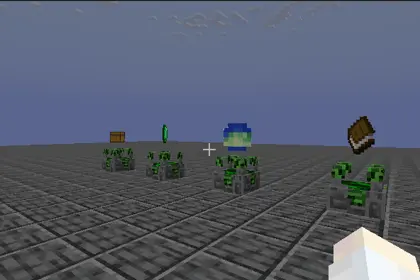
This is your base for trading, storage, contract selection, and map choice. The hideout is locked to daytime with clear weather. Hunger and saturation are automatically restored, and hostile mob spawning as well as player-versus-player damage are prevented.
Global Stash
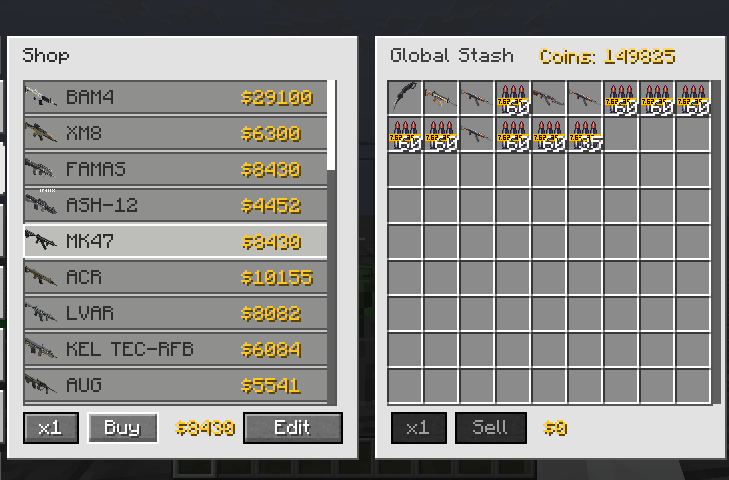
This is the permanent storage space for all extracted gear and loot. It supports depositing, withdrawing, sorting, categorising, and filtering. You can also purchase insurance for up to four item stacks. Even if a raid fails, insured equipment will be returned to your stash.
Contracts (Quest System)
Before a raid, you can accept up to five side contracts at the quest terminal. Upon entering a raid, a primary main task is automatically assigned. Quest types are varied and include killing specific entities, collecting certain items, exploring target locations, defending positions, activating blocks, and hunting elite bosses. Rewards are granted only upon successful extraction.
Map Selection and Difficulty Levels
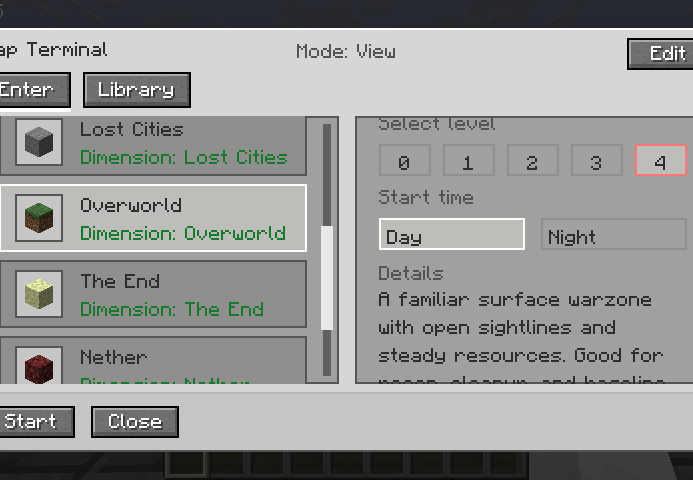
You can choose between vanilla dimensions such as the Overworld, the Nether, and the End, compatible mod dimensions like the Twilight Forest and the Lost Cities, or custom imported maps. Difficulty levels range from 0 to 4. Higher levels increase the raid area size and provide higher quest reward multipliers, up to three times. Levels 0 and 1 have only one extraction point and no guards, while levels 2 to 4 feature multiple extraction points and may spawn extraction guards.
Extraction Rules
Follow the red X marker and the beacon beam of light to locate the extraction point. Stand inside the red carpet ring and wait for the countdown to finish, which is set to 10 seconds by default. Leaving the ring immediately resets the countdown, so you must remain inside continuously. Each extraction point can only be used once per raid.
Tactical Terminal (In-Raid Tracking and Navigation)
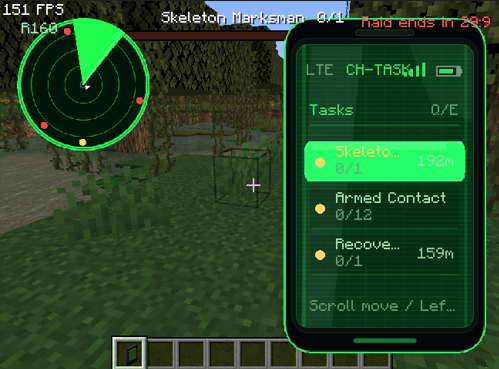
Upon entering a raid, you receive a temporary tactical terminal item. This is your primary tool for navigation and target tracking during the raid.
- Right-click while holding the terminal to open the tracking list, where you can view tasks, teammates, and extraction points.
- Shift-right-click to toggle the minimap display in the top-left corner of your screen.
- In the tracking list, press Q or E to switch between the task, player, extraction, and map tool pages.
- Use the mouse wheel to highlight different entries, then left-click a highlighted entry to manually track that target.
- Once a target is tracked, its direction, distance, and name are shown on the heads-up display.
- The tactical terminal is temporary. It cannot be deposited into the stash, insured, or sold, and it disappears automatically when the raid ends.
Death and Insurance
Dying in a raid causes you to drop all items that were acquired during the raid. However, equipment that you brought into the raid can be protected. This can be done either through the vanilla keepInventory rule or through LootRun's insurance system, which covers up to four stacks. Protected gear is returned to your global stash upon raid failure.
Party System
Up to four players can form a party. The party leader proposes a map and difficulty level, and all members must confirm their readiness before the raid begins. Party members share quest progress and must complete objectives and extract together.
Part Two: Compatibility and Mod Integration
JEI integration allows LootRun to automatically read all recipes and recursively calculate item prices, generating a complete price library. The modpack author needs to configure this only once. After that, players do not need JEI installed to use the generated pricing system.
The Lost Cities mod is supported with an automatic City Raid dimension, and world generation is adjusted to better integrate with the raid gameplay.
Timeless and Classics Zero support ensures that guns, ammunition, and attachments are distinguished by stable IDs, giving each variant an independent price and preventing confusion caused by NBT differences.
Other mods receive general support through the Forge registry, recipes, and JEI. As long as a custom machine correctly exposes its recipes, its products can also be priced.
Additional task and mechanic support is provided for mods such as The Twilight Forest, Ice and Fire, Create, Cataclysm, SearchCarefully, and Simple Enemy Mod.
Part Three: Guide for Modpack Authors and Server Owners
Setting Prices and Generating the Economy Library
First, enter Creative mode with operator permission level 2. Then open the trade terminal and switch to edit mode. Set a shop price for raw materials. The system will automatically calculate its base value, which serves as the seed for recipe derivation. Click Scan JEI Prices, and LootRun will recursively compute prices for all recipes, generating these two files: config/lootrun/trade_config.json and config/lootrun/generated_recipe_prices.json.
Custom Quests
Use the in-game task author mode to create new quests and save them to config/lootrun/tasks/. The task_overrides.json file allows you to hide or disable built-in tasks, as well as adjust their weights, categories, and visibility.
Custom Maps
Place a 1.20.1 Java edition world folder into lootrun/maps/imports/. Then use the in-game map editor to set spawn points, extraction points, loot chests, and task locations. Once edited, the map is stored in lootrun/maps/library/ and can be packaged for distribution.
Adjusting Server Configuration
Edit the file at worldfolder/serverconfig/lootrun-server.json to configure raid duration, which is 30 minutes by default, extraction countdown time, which is 10 seconds by default, number of extraction points, guard spawn chances and maximum counts, maximum insurable item stacks, entry chunk loading count, and item blacklists.
Distributing Your Modpack
Include the generated config/lootrun/ folder containing all price and quest data, as well as lootrun/maps/ if you have custom maps, in your modpack. Players do not need JEI installed, because the price library is already built in.
Part Four: Disclaimer and Important Notes
This mod is developed by an individual. Although it has been extensively tested, there may still be undiscovered bugs, compatibility issues, or balance imperfections.
Please be sure to back up your worlds and configuration files. Custom maps must be in Java 1.20.1 format. Bedrock worlds or worlds from newer versions may fail to load. Large modpacks may cause long JEI scanning or map preloading times, so please be patient. The first time you enter a new world, the hideout may experience a brief stutter during loading. This is a normal part of the warm-up process.
If you encounter issues, check the logs or report them to the community. I will try to fix problems, but I cannot guarantee perfect compatibility with every mod. By using this mod, you acknowledge that you have read and accept these risks.
Thank you to all testers and community members for your feedback. Good luck with your looting and stay safe on extraction. github
- Edition: Minecraft Java
- File type: .jar
- Minecraft versions listed: 1.20.1, 1.20.2, 1.20.3
- How to install: Install the matching mod loader (Forge, Fabric or NeoForge) for your Minecraft version. → Download the .jar. → Put it in the .minecraft/mods folder and launch that loader profile.
- Where to get it: Opens on Modrinth — not every file is mirrored on our own servers.
Install steps are the general flow for this file type — How to install Minecraft Java mods & modpacks walks through it step by step.
- Ships as lootrun-1.0.10.jar — drop this file into the mods folder
- Download size: 1.2 MB
- Download link checked 17 Oct 2026 — working
These come from our own check of the pack file, not from the source page.