
CAT HUD
CAT HUD C ompass, A xis & T ime HUD — a lightweight Fabric mod for Minecraft 26.2 ("Chaos Cubed") that puts a clean compass ribbon, your coordinates, and…
⬇ Download on Modrinth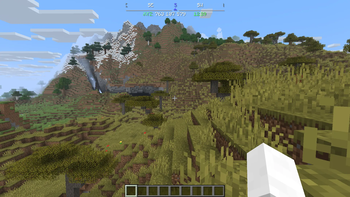
CAT HUD
Compass, Axis & Time HUD — a lightweight Fabric mod for Minecraft 26.2 ("Chaos Cubed") that puts a clean compass ribbon, your coordinates, and the in-game clock right at the top of your screen.
What it does
No more flickering action bar, no boss-bar graphic eating up space — just the information, rendered as plain text and a scrolling compass strip.
- Compass ribbon scrolls smoothly as you turn, showing N/S/E/W and the intercardinal directions around your current heading
- A small triangle indicator marks exactly where you're facing, and it's colored to match whichever direction it's pointing at
- Coordinates + time sit underneath as a single text line, no background box
- Pick 12-hour (AM/PM) or 24-hour time
- Resize the whole thing with a single scale setting, reposition it anywhere on screen
- Every color is customizable, including a separate color for each cardinal direction (so North can be red, South blue, East green, West gold — or whatever you like)
- Show/hide the ribbon and the text line independently
- A keybind to toggle the entire HUD on/off instantly
Installation
- Install Fabric Loader for Minecraft 26.2
- Grab Fabric API — required
- Grab Cloth Config and Mod Menu for 26.2 — only needed if you want the in-game settings screen (see below)
- Drop
cathud-<version>.jarfrom Releases into your.minecraft/modsfolder
Customizing it
If you have Mod Menu and Cloth Config installed, open Mods → CAT HUD → Config in game. Settings are grouped into:
- General — master on/off switch, show/hide the ribbon or the text line independently, 12/24-hour time
- Position & Size — a single scale slider for the whole HUD, plus X/Y offset to move it anywhere on screen
- Ribbon — how wide it is, how many degrees of heading are visible across it, and how close to dead-center counts as "facing that direction"
- Colors — the ribbon's normal/edge-fade text colors and the coordinates/time text colors
- Directions — a dedicated color for North, South, East, and West. Whichever one you're currently facing (or closest to) controls both the highlighted ribbon label and the triangle indicator's color
Don't have Mod Menu/Cloth Config? Every setting also lives in a plain JSON file at
.minecraft/config/cathud.json — edit it by hand and restart the game.
License
CC0-1.0 (public domain)
Credits
- Author: xAtomicManx
- Logo: hand-designed in Affinity Designer
Want to build it yourself or poke at the code? See https://github.com/xAtomicManx/CAT-HUD
- Edition: Minecraft Java
- File type: .jar
- Minecraft version listed: 26.2
- How to install: Install the matching mod loader (Forge, Fabric or NeoForge) for your Minecraft version. → Download the .jar. → Put it in the .minecraft/mods folder and launch that loader profile.
- Where to get it: Opens on Modrinth — not every file is mirrored on our own servers.
Install steps are the general flow for this file type — How to install Minecraft Java mods & modpacks walks through it step by step.
- Ships as cathud-1.0.0+mc26.2.jar — drop this file into the mods folder
- Download size: 37 KB
- Download link checked 12 Sept 2026 — working
These come from our own check of the pack file, not from the source page.