Show Everything (Forge Port)
Forge port of MinersLab/show-everything.
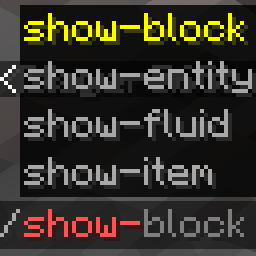
Show items, blocks, fluids, and entities in chat with hover details. The command logic runs on the server, and the mod declares remote clients as optional, so vanilla/Forge clients without this mod can still join.
Clients that also install this mod get enhanced /show-item rendering for very large item NBT. Clients without the mod receive a safe shortened hover instead, so oversized NBT cannot kick players through Minecraft's chat packet string limit.
Commands
All commands are available to normal players.
| Command | Description |
|---|---|
/show-item |
Shows the item in your main hand, or offhand if the main hand is empty. |
/show-block |
Shows the block you are looking at within 15 blocks. Falls back to your current position. |
/show-block <x> <y> <z> |
Shows the block at a specific position. |
/show-fluid |
Shows the fluid you are looking at within 15 blocks. Falls back to your current position. |
/show-fluid <x> <y> <z> |
Shows the fluid/block at a specific position. |
/show-entity |
Shows the entity you are looking at within 15 blocks. Falls back to yourself. |
/show-entity <selector> |
Shows a selected entity. |
Aliases without hyphens are also registered, such as /showitem and /showblock.
Client keybind (since v1.0.5)
With the client mod installed, an optional keybind (customizable in Controls, default H) shows the item under the cursor in chat. It works in any screen where an item tooltip is displayed — container screens, other mods' GUIs, and item-list overlays such as JEI/REI/EMI — and requires the server to run the mod. The chat output is identical to /show-item.
- Edition: Minecraft Java
- File type: .jar
- Minecraft version listed: 1.21.1
- How to install: Install the matching mod loader (Forge, Fabric or NeoForge) for your Minecraft version. → Download the .jar. → Put it in the .minecraft/mods folder and launch that loader profile.
- Where to get it: Opens on Modrinth — not every file is mirrored on our own servers.
Install steps are the general flow for this file type — How to install Minecraft Java mods & modpacks walks through it step by step.
- Ships as showeverything-1.0.5-neoforge-1.21.1.jar — drop this file into the mods folder
- Download size: 36 KB
- Download link checked 24 Aug 2026 — working
These come from our own check of the pack file, not from the source page.