Quick Stack Charm
Java mod listed for Minecraft 26.x. Downloads from the MC Java Mods app on Android.
Right-click any container (chest, barrel, shulker box, hopper, dropper, etc.) while holding the charm and items from your inventory that match types…
⬇ Download on ModrinthQuick Stack is one item, doing one job, well.
Craft a Quick Stack Charm from a chest and an ender pearl (shapeless). Hold it and right-click any container — chest, barrel, shulker box, hopper, dropper. Items in your inventory that match types the container already holds get pushed in.
Why "already holds"?
The charm never introduces new item categories to a container. If your iron chest is full of iron ingots, blocks and nuggets, quick-stacking against it will only top up those three. Everything else stays in your inventory. Sorted storage rooms stay sorted; you don't have to clean up afterwards.
Features
Super simple and easy to use. Hotbar protected. By default the mod skips your hotbar so your tools and food don't get taken. Toggle in the config. Soft feedback. Optional pickup sound and a private chat message telling you how many items moved.
Compatibility
Works with vanilla containers and any modded storage block that implements the standard Container interface.
Recipe:
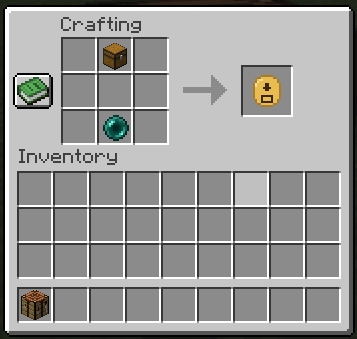
Put a chest and an Ender Pearl anywhere in the crafting grid.
- Edition: Minecraft Java
- File type: .jar
- Minecraft versions listed: 26.1, 26.1.1, 26.1.2
- How to install: Install the matching mod loader (Forge, Fabric or NeoForge) for your Minecraft version. → Download the .jar. → Put it in the .minecraft/mods folder and launch that loader profile.
- Where to get it: Opens on Modrinth — not every file is mirrored on our own servers.
Install steps are the general flow for this file type — How to install Minecraft Java mods & modpacks walks through it step by step.
- Ships as quickstack-1.0.0.jar — drop this file into the mods folder
- Download size: 13 KB
- Download link checked 4 Oct 2026 — working
These come from our own check of the pack file, not from the source page.