TetherMine - Vein Miner
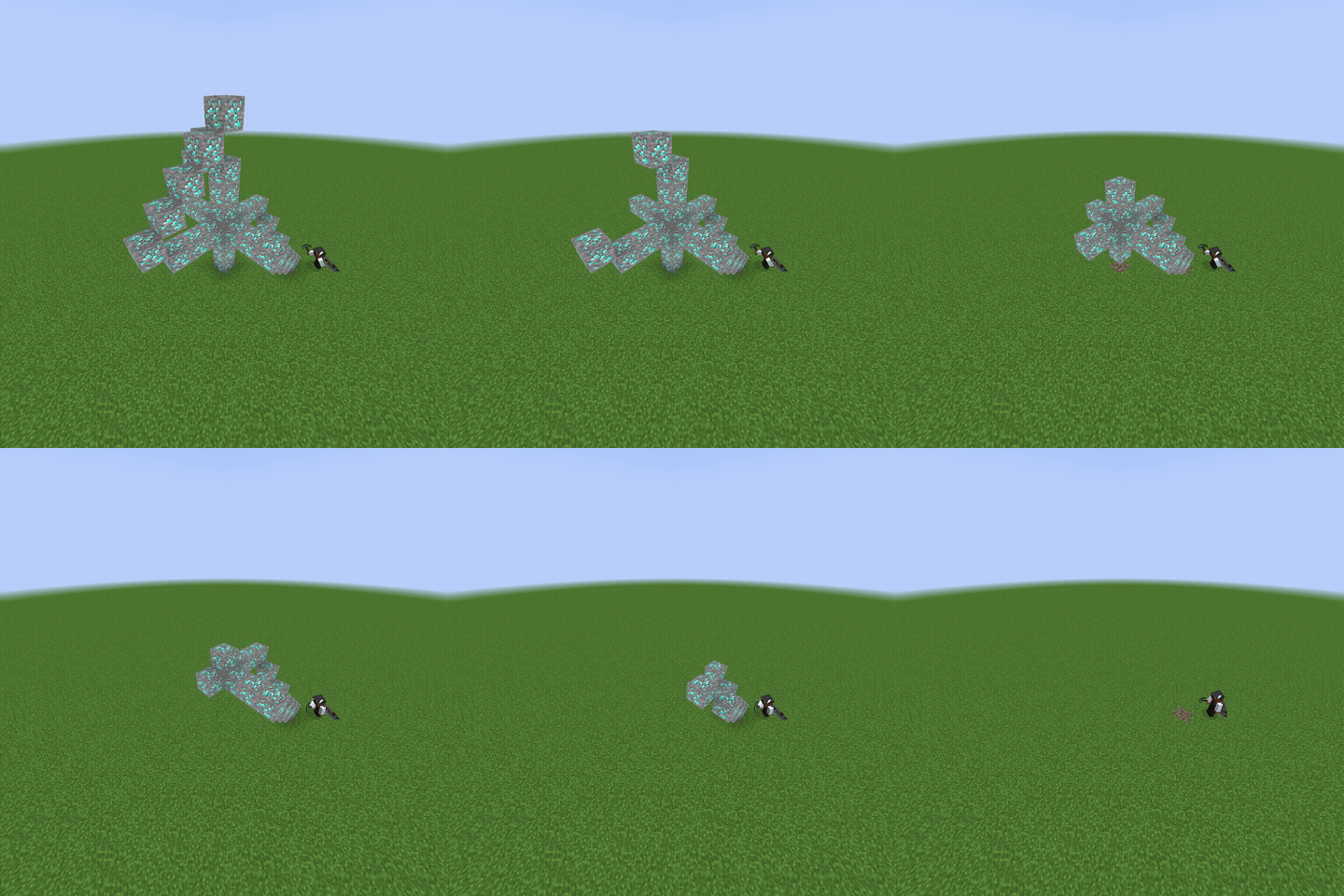
Sneak while mining ores or logs, and TetherMine breaks the farthest connected matching block first. The starting block breaks last, drops are delivered to…
⬇ Download on Modrinth

TetherMine is a Fabric mod for singleplayer and servers that changes how ores and logs are mined while sneaking.
Sneak while mining an ore or log, and TetherMine will search connected matching blocks, break the farthest one first, and deliver its drops to your feet. Keep mining the starting block to work through the whole vein or tree. The block you started on breaks last.
TetherMine supports diagonal connections, vanilla ores, vanilla logs, raw ore blocks, ancient debris, and many modded ores/logs automatically when they follow common block ID names like _ore, _log, _wood, _stem, or _hyphae.
Server owners and singleplayer users can customize behavior with config/tethermine.json or Mod Menu:
{
"max_scan_blocks": 256,
"additional_blocks": [
"minecraft:raw_iron_block = iron_ore",
"minecraft:raw_gold_block = gold_ore",
"minecraft:raw_copper_block = copper_ore",
"minecraft:ancient_debris"
],
"disabled_blocks": []
}
max_scan_blocks controls how many connected matching blocks TetherMine checks per mining attempt. The default is 256, which is enough for normal veins and large trees while keeping performance safe.
additional_blocks lets you add blocks that TetherMine should handle. Use block_id = family_key to connect a block to an existing group. For example, minecraft:raw_copper_block = copper_ore makes raw copper blocks mine with copper ore. You can also add a block by itself, like minecraft:ancient_debris, to make it work as its own group.
disabled_blocks lets you turn off specific blocks. For example, adding minecraft:diamond_ore prevents TetherMine from handling regular diamond ore, even though it would normally be detected automatically.
TetherMine is server-side only for multiplayer, so players do not need to install it to join a server that has it.
- Edition: Minecraft Java
- File type: .jar
- Minecraft version listed: 26.2
- How to install: Install the matching mod loader (Forge, Fabric or NeoForge) for your Minecraft version. → Download the .jar. → Put it in the .minecraft/mods folder and launch that loader profile.
- Where to get it: Opens on Modrinth — not every file is mirrored on our own servers.
Install steps are the general flow for this file type — How to install Minecraft Java mods & modpacks walks through it step by step.
- Ships as tethermine-1.2.3+26.2.jar — drop this file into the mods folder
- Download size: 107 KB
- Download link checked 7 Sept 2026 — working
These come from our own check of the pack file, not from the source page.