
ModsJava
ClearLags
Automatically clears dropped items on a configurable timer with warning messages, a manual /clearlags command, and an optional HUD countdown overlay.
⬇ Download on Modrinth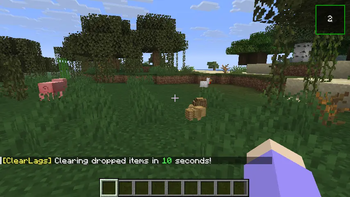
ClearLags
Automatically clears dropped items on a configurable timer with warning messages, a manual /clearlags command, and an optional HUD countdown overlay.
ClearLags is a lightweight server-side Fabric mod that keeps your world clean by automatically removing dropped items on a configurable interval.
Features
- Auto-clear timer — drops are cleared every N seconds (configurable, default 60).
- Warning message — broadcasts a customizable warning a few seconds before each clear (e.g., "Clearing in 10 seconds").
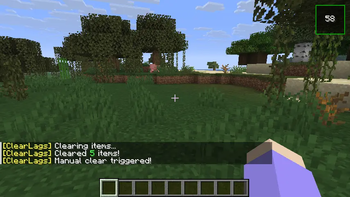
/clearlagscommand:/clearlags clear— triggers an immediate clear (permission: GAMEMASTER)./clearlags reload— reloads config from disk (permission: ADMIN)./clearlags gui on|off|placement— toggles the HUD overlay or cycles its screen position (4 corners).
- Configurable messages — all chat messages can be customized or disabled. Use
%killedfor item count and%secondsfor countdown. - Optional HUD — players with the mod see a small square overlay showing the seconds remaining before the next clear. It can be moved to any corner or turned off.
- Client-optional — the mod works fully on the server; the HUD overlay only appears for players who also have the mod installed.
Config (config/clearlags.json)
{
  "clearInterval": 60,
  "warningTime": 10,
  "warningMessage": "§e[ClearLags] §fClearing dropped items in §a%seconds §fseconds!",
  "warningMessageEnabled": true,
  "clearMessage": "§e[ClearLags] §fClearing dropped items...",
  "clearMessageEnabled": true,
  "afterClearMessage": "§e[ClearLags] §fCleared §a%killed §fitems!",
  "afterClearMessageEnabled": true
}
Requirements
- Minecraft 26.1.2
- Fabric Loader >= 0.19.2
- Fabric API
License
CC-BY-NC-4.0
Quick facts
- Edition: Minecraft Java
- File type: .jar
- Minecraft versions listed: 26.1.2, 26.2
- How to install: Install the matching mod loader (Forge, Fabric or NeoForge) for your Minecraft version. → Download the .jar. → Put it in the .minecraft/mods folder and launch that loader profile.
- Where to get it: Opens on Modrinth — not every file is mirrored on our own servers.
Install steps are the general flow for this file type — How to install Minecraft Java mods & modpacks walks through it step by step.
Verified by MCModsHub
- Ships as ClearLags-1.0.0.jar — drop this file into the mods folder
- Download size: 25 KB
- Download link checked 20 Aug 2026 — working
These come from our own check of the pack file, not from the source page.