
VeloxClarity
Java mod listed for Minecraft 1.21. Downloads from the MC Java Mods app on Android.
VeloxClarity is a lightweight, client-side Fabric mod designed for PvP players who want cleaner visuals and better combat readability — without crossing…
⬇ Download on Modrinth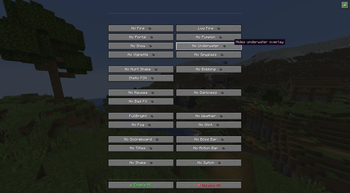
✨ VeloxClarity
A lightweight client-side visual enhancement mod for Minecraft Fabric 1.21.11. Built for players who want a cleaner screen, better visibility, and zero unnecessary distractions.
🎯 Why VeloxClarity?
Minecraft's default visual effects can often get in the way—especially during PvP, parkour, or fast-paced gameplay.
VeloxClarity removes visual clutter while keeping the game completely vanilla-friendly. Every feature is purely cosmetic and runs entirely on your client.
No cheats. No exploits. No packet modifications. Just a cleaner and more comfortable Minecraft experience.
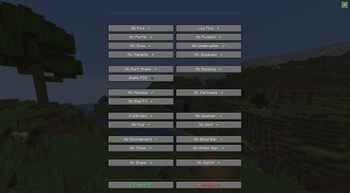
Open the configuration menu anytime by pressing B, enable only the features you want, and all settings will be saved automatically.
⚡ 24 Individual Features
Every option can be enabled or disabled independently.
🛡️ Overlay Improvements
| Feature | Description |
|---|---|
| 🔥 No Fire Overlay | Removes the first-person fire overlay for maximum visibility while burning. |
| 🔥 Low Fire | Lowers the fire animation so it no longer blocks your crosshair. |
| 🌀 No Portal Overlay | Removes Nether Portal distortion. |
| 🎃 No Pumpkin Overlay | Removes the carved pumpkin screen overlay. |
| ❄️ No Powder Snow | Removes the freezing vignette effect. |
| 🌊 No Underwater Overlay | Removes underwater distortion. |
| 🌑 No Vignette | Removes dark screen edges. |
| 🔭 No Spyglass Overlay | Removes the spyglass frame. |
🎥 Camera
| Feature | Description |
|---|---|
| 💥 No Hurt Camera | Removes camera shake when taking damage. |
| 🚶 No View Bobbing | Disables walking camera movement. |
| 🎯 Static FOV | Prevents FOV changes caused by sprinting, bows, or speed effects. |
✨ Effect Removal
| Feature | Description |
|---|---|
| 🤢 No Nausea | Removes nausea distortion. |
| 🌑 No Darkness | Removes the Darkness visual effect. |
| 🫧 Hide Negative Particles | Hides particles from negative status effects. |
👁️ Visual Enhancements
| Feature | Description |
|---|---|
| 💡 FullBright | Maximum brightness in every dimension. |
| 🌧️ No Weather | Hides rain and snow particles. |
| 🌫️ No Fog | Removes distance fog. |
| ✨ No Enchant Glint | Removes the enchantment glow from items. |
📊 HUD Options
| Feature | Description |
|---|---|
| 📋 No Scoreboard | Hides the sidebar scoreboard. |
| 👑 No Boss Bar | Hides boss health bars. |
| 📝 No Titles | Hides title and subtitle messages. |
| 💬 No Action Bar | Hides action bar notifications. |
⚙️ Miscellaneous
| Feature | Description |
|---|---|
| 📷 No Screen Shake | Removes all remaining camera shake effects. |
| 🔄 No Item Switch Animation | Removes the hand animation when changing items. |
🖥️ Modern Configuration Menu
Press B to open the built-in GUI.
The menu includes:
- 🎨 Clean modern interface
- 📂 Organized categories
- 📑 Two-column layout
- 💬 Helpful tooltips
- ✅ Enable All button
- ❌ Disable All button
- 🔊 Optional interface sounds
- ⚡ Instant opening with no blur or lag
Every setting is saved automatically.
🌍 Language Support
VeloxClarity automatically detects your Minecraft language.
Supported languages:
- 🇺🇸 English
- 🇷🇺 Русский
🛡️ Multiplayer & Anti-Cheat Safe
VeloxClarity is 100% client-side.
It never modifies gameplay mechanics, communicates with servers, or sends custom packets.
This mod does NOT include:
- ❌ Aim Assist
- ❌ Kill Aura
- ❌ Auto Clicker
- ❌ Reach
- ❌ Velocity
- ❌ ESP
- ❌ Tracers
- ❌ X-Ray
- ❌ Packet exploits
- ❌ Server-side modifications
Every feature affects only what you see on your own screen.
📥 Installation
- Install Fabric Loader.
- Install Fabric API.
- Place VeloxClarity.jar into your
modsfolder. - Launch Minecraft.
- Press B to customize the mod.
🚀 Performance
VeloxClarity is designed to be extremely lightweight.
✔ Minimal memory usage
✔ Negligible CPU usage
✔ Fast GUI
✔ No unnecessary rendering
✔ Optimized for long multiplayer sessions
📋 Compatibility
- Minecraft 1.21.11
- Fabric Loader
- Client-side
- Singleplayer
- Multiplayer
📄 Information
| Property | Value |
|---|---|
| Author | Focus |
| Version | 1.0.0 |
| License | MIT |
| Environment | Client |
- Edition: Minecraft Java
- File type: .jar
- Minecraft version listed: 1.21.11
- How to install: Install the matching mod loader (Forge, Fabric or NeoForge) for your Minecraft version. → Download the .jar. → Put it in the .minecraft/mods folder and launch that loader profile.
- Where to get it: Opens on Modrinth — not every file is mirrored on our own servers.
Install steps are the general flow for this file type — How to install Minecraft Java mods & modpacks walks through it step by step.
- Ships as veloxclarity-1.0.0.jar — drop this file into the mods folder
- Download size: 1.5 MB
- Download link checked 22 Oct 2026 — working
These come from our own check of the pack file, not from the source page.