
Ore Tuner
Tune every ore — vanilla and modded — right from the world creation screen: vein size, frequency, height, and on/off, saved per world.
⬇ Download on Modrinth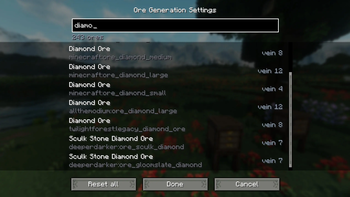

Ore Tuner
Ever wanted diamonds in huge veins, iron everywhere, or a world with no coal at all — without hunting through config files or writing a datapack? Ore Tuner puts ore generation in your hands, right where you make the world.
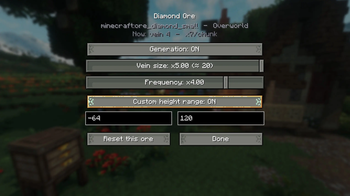
Click the new Ore Generation button on the Create New World screen and you get a searchable list of every ore in your game — vanilla and modded. For each one you can dial in:
🪨 Vein size — how many blocks each vein contains 🎲 Frequency — how many veins generate per chunk 📏 Height range — the min/max Y the ore spawns at 🔀 Enable / disable — turn any ore's generation off entirely Per-world, not global
Your settings are baked into the world you're creating and saved with it. Other worlds are untouched, and your global game files are never modified — so every world can have its own ore balance.
Works with modded ores automatically
Ore Tuner reads the ores from your game's world-generation data, so it picks up ores from other mods on its own — no per-mod patches or compatibility add-ons needed.
How it works
When you finish editing, Ore Tuner writes a small per-world datapack describing your changes and applies it before the world generates, so your tweaks take effect from the very first chunk. Everything is done through the game's own data system — no edits to vanilla generation.
Requirements: Minecraft 1.21.1 · NeoForge
- Edition: Minecraft Java
- File type: .jar
- Minecraft versions listed: 1.21.1, 1.21.2, 1.21.3
- How to install: Install the matching mod loader (Forge, Fabric or NeoForge) for your Minecraft version. → Download the .jar. → Put it in the .minecraft/mods folder and launch that loader profile.
- Where to get it: Opens on Modrinth — not every file is mirrored on our own servers.
Install steps are the general flow for this file type — How to install Minecraft Java mods & modpacks walks through it step by step.
- Ships as oretuner-0.1.0.jar — drop this file into the mods folder
- Download size: 41 KB
- Download link checked 22 Aug 2026 — working
These come from our own check of the pack file, not from the source page.