
CardEngine
A lightweight framework that adds an interactive card-drafting system for custom player upgrades and RPG mechanics.
⬇ Download on Modrinth
🃏 CardEngine
The easiest way to create and render interactive RPG upgrade cards in Minecraft!
💡 Check out the Wiki for full integration details and advanced custom logic binding!
CardEngine is a lightweight, high-performance framework library designed for mod developers to implement card-based upgrade systems effortlessly. It handles all the heavy lifting—from capability storage, client-server packet synchronization, and smooth render overlays, to interactive card drafting interfaces.
⚡ Why Choose CardEngine?
🛠️ 2-Line Setup
Register cards and bind upgrade mechanisms with just 2 lines of code! CardEngine automatically handles rendering, capability tracking, and networking under the hood.
⚙️ Auto-Generated Templates & @CardParam
Save time by skipping manual JSON generation. Simply register cards programmatically in Java, and CardEngine will automatically write clean, editable JSON configuration files to the config folder on the first startup.
Smart Parameter Exporting: Use the @CardParam annotation on your fields! CardEngine will automatically detect them and export these values as configurable parameters inside the card's JSON file.
Dynamic UI Syncing: Once the JSON is generated, any manual tweaks you make to the values will be dynamically reloaded and reflected directly on the framework's UI overlays without rewriting a single line of Java code.
🎮 Built-in Interfaces
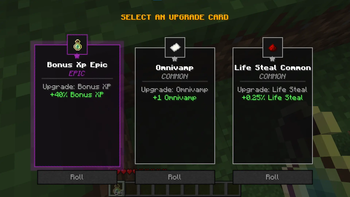
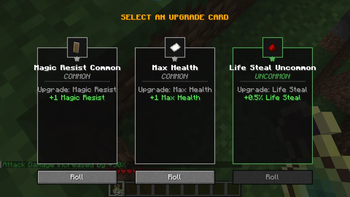
Comes out-of-the-box with a premium card drafting select screen (featuring smooth fade-in transitions) and a scrollable overlay showing consolidated player stats (toggled using the [ L ] key).
🚀 Quick Example
// Line 1: Register upgrade mechanism (Binds to Minecraft Attributes or custom logic) CardRegistry.registerCard("my_mod:attack_damage", Attributes.ATTACK_DAMAGE);
// Line 2: Register a card and add it to the selection pool CardRegistry.register("my_mod:ad_common", "my_mod:attack_damage");
- Edition: Minecraft Java
- File type: .jar
- Minecraft versions listed: 1.20.1, 1.20.2, 1.20.3
- How to install: Install the matching mod loader (Forge, Fabric or NeoForge) for your Minecraft version. → Download the .jar. → Put it in the .minecraft/mods folder and launch that loader profile.
- Where to get it: Opens on Modrinth — not every file is mirrored on our own servers.
Install steps are the general flow for this file type — How to install Minecraft Java mods & modpacks walks through it step by step.
- Ships as card_engine-1.0.1.jar — drop this file into the mods folder
- Download size: 99 KB
- Download link checked 22 Aug 2026 — working
These come from our own check of the pack file, not from the source page.