VanillaFlux
Java modpack listed for Minecraft 1.21. Downloads from the MC Java Mods app on Android.
⬇ Download on Modrinth
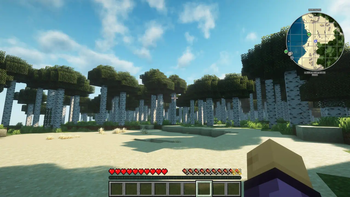







Fed up with bland scenery or clunky menus? VanillaFlux breathes new life into every corner of Minecraft—without ever adding a single extra block or item. Imagine…
Worlds that feel handcrafted. Ancient towers and hidden ruins rise naturally in your biomes, daring you to explore deeper.
Atmospheres that whisper stories. Flickering torchlight, drifting fog, and dynamic shadows make nighttime feel alive.
Controls that simply work. Drag, drop, sort, tweak—your inventory and HUD stay out of your way, so you stay in the flow.
Stability that never quits. Rainstorms, nether highways, end cities—VanillaFlux keeps everything running smooth, whether you’re on a beastly rig or a modest laptop.
This is Minecraft, as it was meant to be: raw, beautiful, and utterly immersive.
🙏 Credits & Links Every mod that powers VanillaFlux—huge thanks to the creators!
Click to view Mod CreditsPerformance & Optimization:
- BadOptimizations
- C2ME
- Cloth Config API
- Continuity
- Dynamic FPS
- EntityCulling
- Fabric API
- Fabric Language Kotlin
- FerriteCore
- ImmediatelyFast
- Iris
- Lithium
- Mod Menu
- More Culling
- Noisium
- Reese's Sodium Options
- Sodium
- Sodium Extra
- Yet Another Config lib
- Zoomify
World Generation & Structures:
- Tectonic
- CliffTree
- Repurposed Structures
- Nullscape
- MES
- MVS
- MNS
- MSS
- Structory
- Structory:Towers
- Amplified Nether
- Medieval Buildings
- Hopo Better Ruined Portals
- Hopo Better Mineshaft
- Immersive Structures
- Medieval Buildings [End]
- Medieval Buildings [Nether]
- Lios Overhauled Villages
- DNT Pillager Outpost
- DNT Swamp Hut
- DNT Ancient City
- DNT Jungle Temple
- DNT Desert Temple
- DNT Nether Fortress
- DNT Stronghold
Visuals & UI/UX:
- EMF
- ETF
- AppleSkin
- LambDynamicLights
- Mouse Tweaks
- Inventory sorting
- OptiGUI
- Better Advancements
- JourneyMap
- Leaves Be Gone
- Clean F3
- Disable custom word advice
Libraries & APIs:
🔮 “Where flux ignites the silent night, Vanilla’s soul takes fearless flight.”
- Edition: Minecraft Java
- File type: .jar
- Minecraft version listed: 1.21.6
- How to install: Install the matching mod loader (Forge, Fabric or NeoForge) for your Minecraft version. → Download the .jar. → Put it in the .minecraft/mods folder and launch that loader profile.
- Where to get it: Opens on Modrinth — not every file is mirrored on our own servers.
Install steps are the general flow for this file type — How to install Minecraft Java mods & modpacks walks through it step by step.
- Downloads as VanillaFlux 1.0.0.mrpack
- Download size: 10 KB
- Download link checked 22 Oct 2026 — working
These come from our own check of the pack file, not from the source page.
Related Java mods

Outer Space Hunt Map (26.2, 1.20.1) – Cosmic Scavenger Showdown

Lavaflow Data Pack (1.21.11) – A Dynamic And Deadly Nether Overhaul

Model Gap Fix

Enhanced Vision

Loot Integrations Underground Villages Stoneholm Mod (1.21.11, 1.20.1) – More Loots For New Structures