
Texture packsBedrock
Player Health Indicator Textures
Bedrock texture pack listed for Minecraft 1.17–1.21. File opened and checked on 30 Sep 2026; installs from the MC Bedrock Mods app on Android.
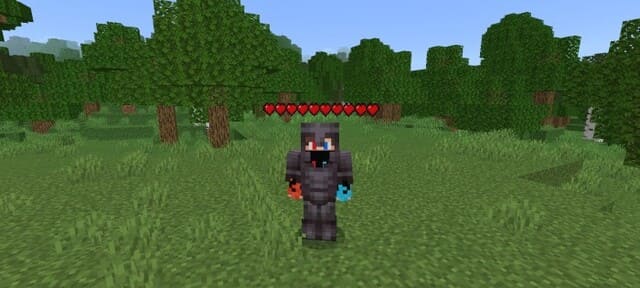
Very simple Player Health Indicator textures will perform only one function in the game: now each player's health will be displayed above their head. The…
⬇ Download


Очень простые текстуры Player Health Indicator будут выполнять только одну функцию в игре: теперь над головой каждого игрока будет отображаться его здоровье. Полоска будет располагаться под никнеймом персонажа.
Это очень полезное улучшение для любителей ПвП, поскольку всегда можно знать, сколько здоровья осталось у противника. Функция помогает выбрать нужную тактику для атаки или стратегию для отступления, чтобы восстановить ХП и сбалансировать драку.
 Изменения в новой версии
Это очень полезное улучшение для любителей ПвП, поскольку всегда можно знать, сколько здоровья осталось у противника. Функция помогает выбрать нужную тактику для атаки или стратегию для отступления, чтобы восстановить ХП и сбалансировать драку.
- Исправили ошибки
- Поддержка мультиплеера
Quick facts
- Edition: Minecraft Bedrock
- File type: .mcpack
- Minecraft versions listed: 1.21.41, 1.21.30, 1.21.20
- How to install: Download the .mcpack. → Open it — Minecraft imports it under Resource Packs. → Activate it in Global Resources, or for one world under Resource Packs → Available.
- Where to get it: In MCModsHub, or directly above on this page.
Install steps are the general flow for this file type — How to install Minecraft Bedrock texture packs walks through it step by step.
File checked by MCModsHub
- Pack type: .mcpack — a single pack
- Manifest requires Minecraft 1.17.0 or newer
- Complete pack — everything it depends on is inside the file
- Download size: 12 KB
- Download link checked 6 Jul 2026 — working
- Mirrored on our own servers — the download does not depend on the original host
These come from our own check of the pack file, not from the source page.