Texture packsBedrock
Custom Bar Textures
Bedrock texture pack listed for Minecraft 1.13–1.16. File opened and checked on 8 Oct 2026; installs from the MC Bedrock Mods app on Android.
Many want to change design elements in Minecraft but don't know how. For example, you can change health and hunger bars. Custom Bar textures will help…
⬇ Download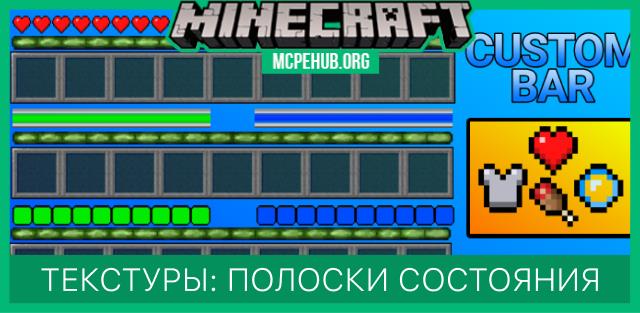






Многие хотят поменять элементы дизайна в Майнкрафт, но не знают как. Например, можно поменять полоски здоровья и голода. В этом помогут текстуры Custom Bar, которые представляет огромное количество вариантов, подходящих любому жителю блочной вселенной. Выберите тот дизайн, который Вы пожелаете и установите к себе в игру. Для смены нужно всего лишь зайти в настройки и выбрать подходящий вариант. Классический вид
 Улучшенный вид
 Перевернутые полоски
 Полоска в виде кусков хлеба
 Полоска голода в виде арбузов
 Полоска голода с яблоками
 Полоска голода в виде моркови
 Голод в виде картофелин
 Голод в виде жареного мяса
 Голод в виде сладких ягод
 Голод в виде капель воды
 Первый вариант
 Второй вариант
 Третий вариант
 Четвертый вариант

Quick facts
- Edition: Minecraft Bedrock
- File type: .mcpack
- Minecraft version listed: 1.16
- How to install: Download the .mcpack. → Open it — Minecraft imports it under Resource Packs. → Activate it in Global Resources, or for one world under Resource Packs → Available.
- Where to get it: In MCModsHub, or directly above on this page.
Install steps are the general flow for this file type — How to install Minecraft Bedrock texture packs walks through it step by step.
File checked by MCModsHub
- Pack type: .mcpack — a single pack
- Manifest requires Minecraft 1.13.0 or newer
- Complete pack — everything it depends on is inside the file
- Download size: 285 KB
- Download link checked 6 Jul 2026 — working
- Mirrored on our own servers — the download does not depend on the original host
These come from our own check of the pack file, not from the source page.