Texture packsBedrock
Vignette Hider Textures
Bedrock texture pack listed for Minecraft 1.13–1.16. File opened and checked on 10 Oct 2026; installs from the MC Bedrock Mods app on Android.
Players often encounter issues when enabling detailed graphics in Minecraft Bedrock. In addition to problems with weak devices and other bugs, users…
⬇ Download
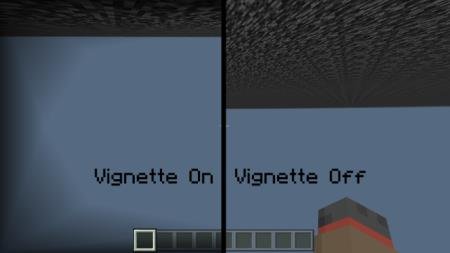

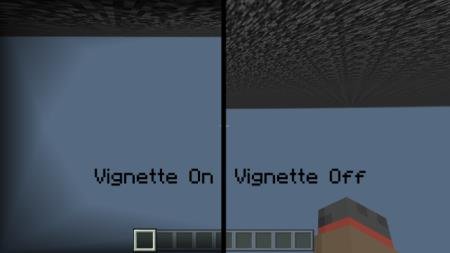
Игроки частенько сталкиваются с проблемами при включении детализированной графики в Майнкрафт Бедрок. Помимо проблем со слабыми устройствами и прочими багами, часто пользователи жалуются на лишние элементы дизайна. Именно с такими вещами призваны бороться текстуры Vignette Hider. Ниже представлен скриншот, который показывает, какие изменения произойдут, если установить данное дополнение.
Граница слева полностью исчезает, если ввести аддон.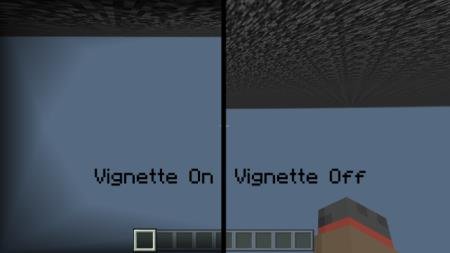 Перезапустите мир, чтобы включить эффект.
Граница слева полностью исчезает, если ввести аддон.
Quick facts
- Edition: Minecraft Bedrock
- File type: .mcpack
- Minecraft version listed: 1.16
- How to install: Download the .mcpack. → Open it — Minecraft imports it under Resource Packs. → Activate it in Global Resources, or for one world under Resource Packs → Available.
- Where to get it: In MCModsHub, or directly above on this page.
Install steps are the general flow for this file type — How to install Minecraft Bedrock texture packs walks through it step by step.
File checked by MCModsHub
- Save it as 187168.mcaddon before opening — it downloads as .mcpack, but it is a .mcaddon pack
- Manifest requires Minecraft 1.13.0 or newer
- Complete pack — everything it depends on is inside the file
- Download size: 74 KB
- Download link checked 6 Jul 2026 — working
- Mirrored on our own servers — the download does not depend on the original host
These come from our own check of the pack file, not from the source page.