
🚨(Please read the description, as there is useful information in it!)🚨
This is Defender Ultima. It is a slime block mech that works only on Bedrock edition. I have been working on it for the past few months and am ready to release it.🙌
—————————————————————————————————————————————————————————————————————————
Features: 📋
-Seamless Cockpit🙌
- 4 Forward facing missiles.➡️
- 1 Left missiles.↩️
- 1 Right missile.↪️
- 2 Backwards missiles.🔙
- Both arms can be launched as missiles.✋
- The reactor in the chest can be launched as a missile. 🔥
- Both legs can be launched. (Not as missiles, but for defense.)🦿
- 2 Upwards missiles.🆙
- 2 Tnt Droppers. (These are flying machines that drop tnt from dispensers.)🧨
- 2 Tnt launchers.💣
- 2 Rail guns (Tnt mine cart launchers.)🚊
- Can self destruct.💥
- 2 Two way flying machine escape pods.🚗
- A two way elevator to get to the robot.🛗
- 26 Forward dispensers.⏩
- 2 Right dispensers.↪️
- 2 Left dispensers.↩️
- 4 Backwards dispensers.🔙
- A durable hull.🦾
- A walking animation.🦿
- All weapons are accessible from the cockpit, because of dispensers with wind bursts and fireworks shooting at target blocks.🎯
- A giant Glass wall to see how much damage each of the missiles can do.🛑
- Moveable tile entities like barrels, crafting tables, and furnaces.🙌
—————————————————————————————————————————————————————————————————————————
Things to note: 📝
-If you are having trouble downloading the file, rename it from DefenderUltima.zip to DefenderUltima.mcworld. 😎
-After many tests I found there is an extremely low chance, that if you push a button the component won’t fire. This is due dispensers shooting in slightly random directions, causing the firework/wind charge to miss the target block by a pixel or so. To fix this, simply press the button you pressed again.🔳
-Turn off Clouds for the best experience.🌥️
-I recommend flying around the robot and looking for all the signs. So you can see how it works.✌️
-Make sure to follow signs exactly and when it says to place a button on a dispenser, please press it and then break it afterward. As it may cause problems later if you do not break it.⛓️💥
-None of the dispensers have arrows in them for performance reasons. If you wish to put arrows in these dispensers, put them in the ones with item frames on them. I cannot stress this enough: Only put arrows in the dispensers with item frames on them. 👾
- To launch the tnt droppers you must launch the legs first because if you don’t the tnt will end up blowing up the legs.🦿
-The robot can still move after things are launched from it. 🦾
-None of the many weapons can be activated while the robot is moving. They can only be activated when the robot is not moving.☝️
-This was made all with redstone and no commands.❌
-If you move the robot after launching the upwards facing missiles The launching mechanisms will be left behind. This is intentional.😎
—————————————————————————————————————————————————————————————————————————
Important instructions (These are things that are too long to fit on signs.)🪧
Rail cannons: 🚊
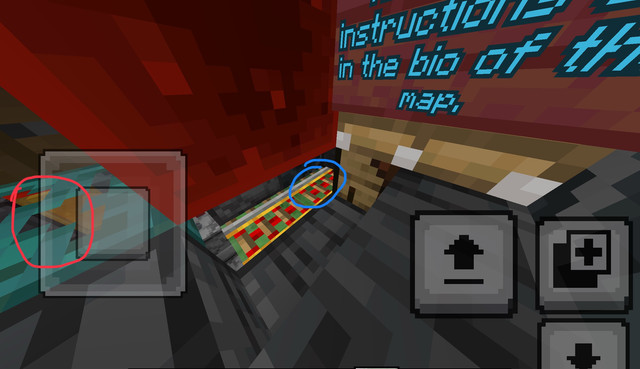
To start place your tnt mine carts on the furthest rail. Which is circled in blue. The more you place the further the cannon will launch. Also make sure that the trap door that is circled in red remains in the position that it is in the picture. Once you are done placing tnt mine carts. Move the robot and they will launch.
Escape pods: ↔️
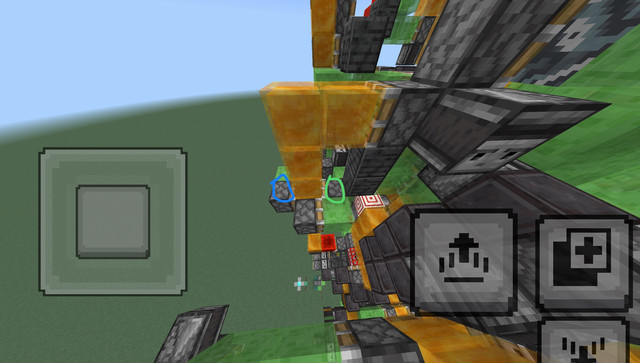
To make the escape pod go backwards, place a redstone block on the piston circled in green. To stop it, place a piece of obsidian on the honey blocks. To make the escape pod go back to the robot, break the redstone block you just placed and place another redstone block on the piston circled in green. The escape pod will continue flying back to the robot until it hits it, which will cause it to stop. Once it connects, everything should still work and if the robot is activated it still should carry the escape pod.
—————————————————————————————————————————————————————————————————————————
Thats all folks! 😏
By Jdcool117!
This is Defender Ultima. It is a slime block mech that works only on Bedrock edition. I have been working on it for the past few months and am ready to release it.🙌
—————————————————————————————————————————————————————————————————————————
Features: 📋
-Seamless Cockpit🙌
- 4 Forward facing missiles.➡️
- 1 Left missiles.↩️
- 1 Right missile.↪️
- 2 Backwards missiles.🔙
- Both arms can be launched as missiles.✋
- The reactor in the chest can be launched as a missile. 🔥
- Both legs can be launched. (Not as missiles, but for defense.)🦿
- 2 Upwards missiles.🆙
- 2 Tnt Droppers. (These are flying machines that drop tnt from dispensers.)🧨
- 2 Tnt launchers.💣
- 2 Rail guns (Tnt mine cart launchers.)🚊
- Can self destruct.💥
- 2 Two way flying machine escape pods.🚗
- A two way elevator to get to the robot.🛗
- 26 Forward dispensers.⏩
- 2 Right dispensers.↪️
- 2 Left dispensers.↩️
- 4 Backwards dispensers.🔙
- A durable hull.🦾
- A walking animation.🦿
- All weapons are accessible from the cockpit, because of dispensers with wind bursts and fireworks shooting at target blocks.🎯
- A giant Glass wall to see how much damage each of the missiles can do.🛑
- Moveable tile entities like barrels, crafting tables, and furnaces.🙌
—————————————————————————————————————————————————————————————————————————
Things to note: 📝
-If you are having trouble downloading the file, rename it from DefenderUltima.zip to DefenderUltima.mcworld. 😎
-After many tests I found there is an extremely low chance, that if you push a button the component won’t fire. This is due dispensers shooting in slightly random directions, causing the firework/wind charge to miss the target block by a pixel or so. To fix this, simply press the button you pressed again.🔳
-Turn off Clouds for the best experience.🌥️
-I recommend flying around the robot and looking for all the signs. So you can see how it works.✌️
-Make sure to follow signs exactly and when it says to place a button on a dispenser, please press it and then break it afterward. As it may cause problems later if you do not break it.⛓️💥
-None of the dispensers have arrows in them for performance reasons. If you wish to put arrows in these dispensers, put them in the ones with item frames on them. I cannot stress this enough: Only put arrows in the dispensers with item frames on them. 👾
- To launch the tnt droppers you must launch the legs first because if you don’t the tnt will end up blowing up the legs.🦿
-The robot can still move after things are launched from it. 🦾
-None of the many weapons can be activated while the robot is moving. They can only be activated when the robot is not moving.☝️
-This was made all with redstone and no commands.❌
-If you move the robot after launching the upwards facing missiles The launching mechanisms will be left behind. This is intentional.😎
—————————————————————————————————————————————————————————————————————————
Important instructions (These are things that are too long to fit on signs.)🪧
Rail cannons: 🚊
To start place your tnt mine carts on the furthest rail. Which is circled in blue. The more you place the further the cannon will launch. Also make sure that the trap door that is circled in red remains in the position that it is in the picture. Once you are done placing tnt mine carts. Move the robot and they will launch.
Escape pods: ↔️
To make the escape pod go backwards, place a redstone block on the piston circled in green. To stop it, place a piece of obsidian on the honey blocks. To make the escape pod go back to the robot, break the redstone block you just placed and place another redstone block on the piston circled in green. The escape pod will continue flying back to the robot until it hits it, which will cause it to stop. Once it connects, everything should still work and if the robot is activated it still should carry the escape pod.
—————————————————————————————————————————————————————————————————————————
Thats all folks! 😏
By Jdcool117!
Quick facts
- Edition: Minecraft Bedrock
- File type: .mcworld
- How to install: Download the .mcworld file. → Open it — Minecraft imports it as a new world. → Find it in your Worlds list and play.
- Where to get it: In MCModsHub, or directly above on this page.
Install steps are the general flow for this file type — How to install Minecraft Bedrock maps walks through it step by step.
Verified by MCModsHub
- Save it as 194629.mcworld before opening — it downloads as .zip, but it is a .mcworld pack
- Download size: 289 KB
- Download link checked 21 Aug 2026 — working
- Mirrored on our own servers — the download does not depend on the original host
These come from our own check of the pack file, not from the source page.