
Block Unhidder+
Bedrock texture pack listed for Minecraft 1.21. File opened and checked on 9 Oct 2026; installs from the MC Bedrock Mods app on Android.
⬇ DownloadIntroductionBlock Unhidder+ is a tweaks texture pack that will makes certain blocks appeared differently compared to their counterparts, you should try this because it will makes your Minecraft journey more easier and practice than before!
Example:
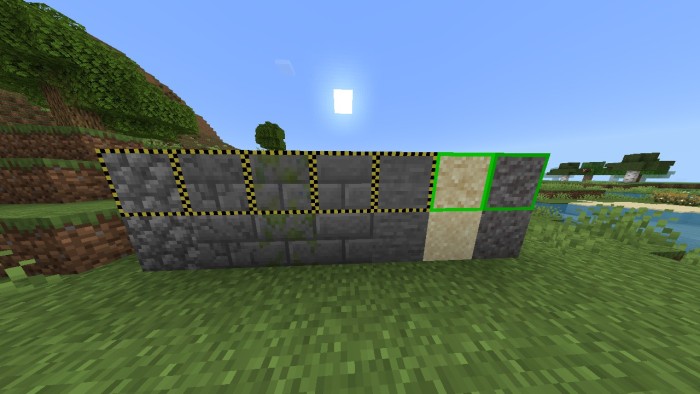
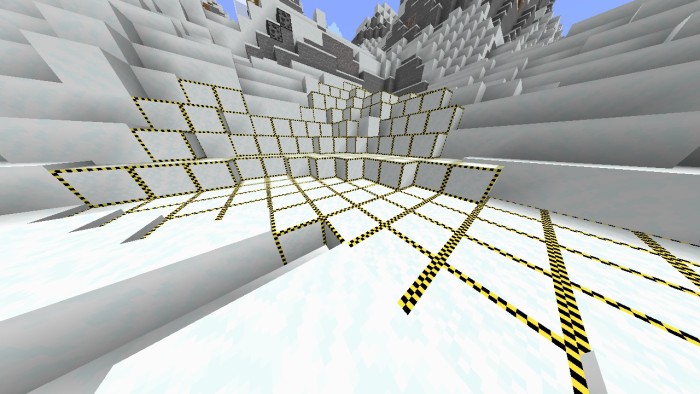
See? The blocks highlighted differently! Including infested variants, suspicious, and powder snow!
Changelog:
- Releasing Block Unhidder+ to MCPEDL
- Added featured image and descriptions
Installation Guide:
To install the texture pack to your Minecraft you need to:
- Download the texture pack on the link below
- Open it with your file manager and choose Minecraft
- And now you have it installed, you can use it inside Minecraft through Global Resource Pack
Warning:
You are allowed to:
- Review this texture pack for your YouTube video
- Use this texture pack for personal use
- Modify it for personal use
- Share the link of this page
You aren't allowed to:
- Using your own link to share it
- Use this texture pack for commercial use
- Modify it besides personal use
- Edition: Minecraft Bedrock
- File type: .mcpack
- Minecraft versions listed: 1.21.70, 1.21.50
- How to install: Download the .mcpack. → Open it — Minecraft imports it under Resource Packs. → Activate it in Global Resources, or for one world under Resource Packs → Available.
- Where to get it: In MCModsHub, or directly above on this page.
Install steps are the general flow for this file type — How to install Minecraft Bedrock texture packs walks through it step by step.
- Pack type: .mcpack — a single pack
- Manifest requires Minecraft 1.21.50 or newer
- Complete pack — everything it depends on is inside the file
- Download size: 60 KB
- Download link checked 2 Aug 2026 — working
- Mirrored on our own servers — the download does not depend on the original host
These come from our own check of the pack file, not from the source page.