
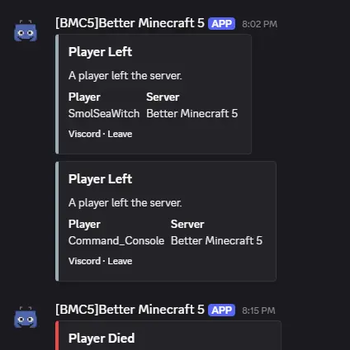

🤖 Viscord: The Ultimate Minecraft-Discord Bridge
Developed by Vonix-Network, Viscord creates a seamless, powerful, and real-time connection between your Minecraft server and your Discord community. Keep your players engaged and your staff connected, no matter where they are!
🚀 Key Features & Functionality
- Two-Way Chat Sync: Instantly syncs messages from your Minecraft server chat to a dedicated Discord channel, and relays Discord messages back into the game.
- Customizable Events: Personalize the messages displayed for player joins, leaves, and server status changes.
- Full Command Integration:
- In-Game Commands (e.g.,
/discord): Used to get the discord link (more to come) - Discord Slash Commands (e.g.
/list): List the players of one server - Discord ! Commands (e.g.
!list): List the players in all servers in channel
- In-Game Commands (e.g.,
🛠️ Command Reference
Note: Always check the official documentation or the /viscord help command for the most current and specific command usage and required permissions.
🔗 Get Started
Viscord is stable, actively maintained, and designed to foster a strong, unified community for your server.
Download Viscord today and connect your worlds!
Dependencies
Kotlin for Forge is required for OkHttp for webhooks!
- Edition: Minecraft Java
- File type: .jar
- Minecraft version listed: 1.20.1
- How to install: Install the matching mod loader (Forge, Fabric or NeoForge) for your Minecraft version. → Download the .jar. → Put it in the .minecraft/mods folder and launch that loader profile.
- Where to get it: Opens on Modrinth — not every file is mirrored on our own servers.
Install steps are the general flow for this file type — How to install Minecraft Java mods & modpacks walks through it step by step.
- Ships as viscord-1.0.3-forge-1.20.1.jar — drop this file into the mods folder
- Download size: 9.5 MB
- Download link checked 6 Sept 2026 — working
These come from our own check of the pack file, not from the source page.