Texture packsBedrock
Glowing Ores | Vibrant Visuals
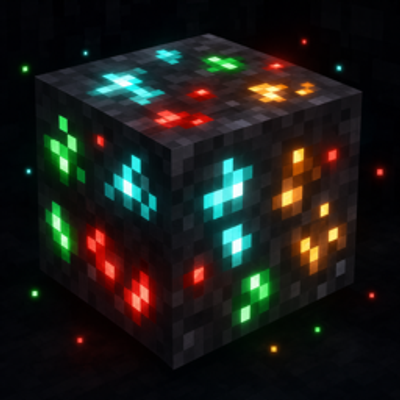
Glowing Ores is a lightweight Minecraft Bedrock visual pack that makes all vanilla ores and valuable blocks easy to spot: brightened ore pixels on classic…
I don't know my version
Open Minecraft and look at the bottom-left corner of the main screen — the version is printed there, like v1.26.30.
The game writes a 1. in front; the buttons above leave it off. v1.26.30 in the game is 26.30 here.


Glowing Ores makes resource gathering in Minecraft Bedrock easier and more satisfying. Ores stand out on every device: brightened textures on classic graphics, and genuine glow in the dark with Vibrant Visuals.
Features
- Works on every graphics mode:
- Classic (Simple/Fancy): ore pixels are brightened and saturated, so veins stand out clearly even in dark caves.
- Vibrant Visuals: ore veins literally glow in the dark. The glow is graded by each ore's natural shading — crystal facets and metal flecks shine brightest — for a natural, non-flat look. Materials are layered on top of Minecraft's official Vibrant Visuals maps, so metals keep their shine, gems stay glossy, and amethyst keeps its translucency.
- Complete Ore Coverage (stone and deepslate variants):
- Coal — subtle ember glow
- Iron, Copper (including oxidized green flecks), Gold — metallic glow
- Redstone — the strongest glow of all ores
- Lapis Lazuli, Emerald, Diamond — bright gem glow
- Nether Quartz and Nether Gold
- Valuable Blocks Support:
- Ancient Debris (side & top) — glowing metallic bands
- Gilded Blackstone — glowing gold flecks
- Amethyst Block, Budding Amethyst, and all Amethyst Clusters and Buds — soft crystal glow
- Mob Spawner — faint ember glow on the cage with brightly glowing fire, easy to spot from a distance
How to use
- Import the
.mcaddonfile into Minecraft Bedrock. - Activate the Glowing Ores resource pack for your world.
- Put it at the top of your active resources list to override default textures correctly.
- Turn on Vibrant Visuals in your Video settings to see the ores glow in the dark.
Notes
- This pack does not contain "X-ray" features; it only enhances blocks you are already looking at.
- The actual glow-in-the-dark effect requires Vibrant Visuals. On classic graphics the brightened textures make ores highly visible but do not emit light.
- The glow is a surface effect: ores shine in darkness but do not light up the surrounding area.
- Fully Vibrant Visuals compatible — enabling this pack never turns Vibrant Visuals off for your world.
Requirements
- Minecraft Bedrock Edition (v1.26.30+)
- No external dependency required
Quick facts
- Edition: Minecraft Bedrock
- File type: .mcpack
- Minecraft versions listed: 26.30, 26.0.02, 26.0
- How to install: Download the .mcpack. → Open it — Minecraft imports it under Resource Packs. → Activate it in Global Resources, or for one world under Resource Packs → Available.
- Where to get it: Opens on CurseForge — not every file is mirrored on our own servers.
Install steps are the general flow for this file type — How to install Minecraft Bedrock texture packs walks through it step by step.
Verified by MCModsHub
- Pack type: .mcaddon — behaviour and resource pack in one file
- Manifest requires Minecraft 1.26.30 or newer
- Complete pack — everything it depends on is inside the file
- Download size: 131 KB
- Download link checked 11 Sept 2026 — working
These come from our own check of the pack file, not from the source page.
